








Use the TwinCAT 3 Online Console
There are two locations for the online console for each axis in the TwinCAT 3 software.
This topic also includes:
Location 1
Location 1 includes the online console for axis 1 and 2.
- In the tree on the left, go to the TwinCAT project > MOTION > NC-Task 1 SAF > Axes > Axis 1.
-
Click the Online tab on the right.
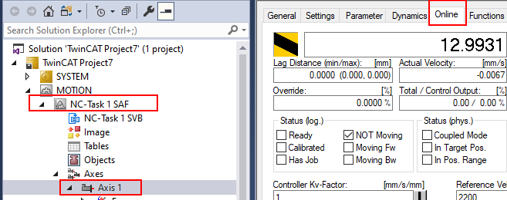
Repeat steps used for Axis 1 using Axis 2.
Location 2
Location 2 includes the online console for axis 1 and 2.
- In the tree on the left, go to the TwinCAT project > I/O > Device 2 (EtherCAT) > Drive 1 AKD2G Dual Axis SIL2.
-
Click the NC-A Online tab on the right.
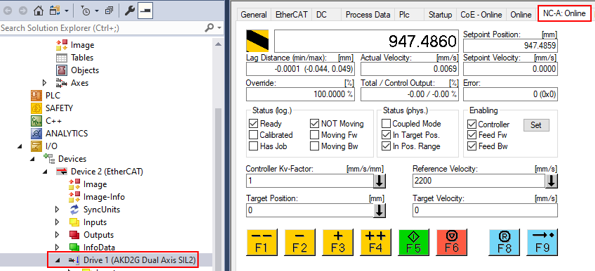
Repeat steps used for Axis 1 and replace NC-A Online with NC-B Online.
Enable an Axis
Enable Axis 1
From WorkBench, both axes’ SW (software enables) are off as shown on the status bar below.

Use TwinCAT 3 in these steps.
- For Axis 1, in the tree on the left, go to the TwinCAT project > I/O > Device 2 (EtherCAT) > Drive 1 AKD2G Dual Axis SIL2.
- Click the NC-A Online tab on the right.
-
Click Set.
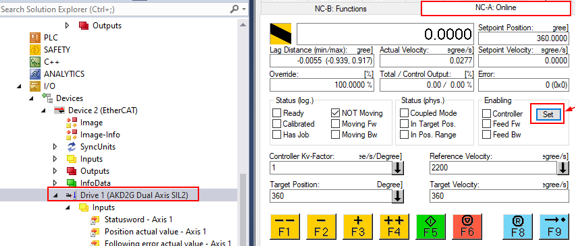
-
Click All in Set Enabling to enable all options.
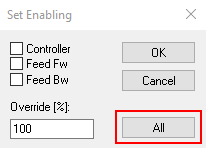
The WorkBench status bar appears as shown below.

Enable Axis 2
Repeat steps used for Axis 1 and replace NC-A Online with NC-B Online.
Start a Position Move
The Target Position field is in degrees and the Target Velocity is in degrees/sec. The image below shows a target position of 360 degrees at a rate of 360 degrees/s.
Axis 1
- In the tree on the left go to the TwinCAT project > I/O > Device 2 (EtherCAT) > Drive 1 AKD2G Dual Axis SIL2.
- Click the NC-A Online tab on the right.
- Click F5.
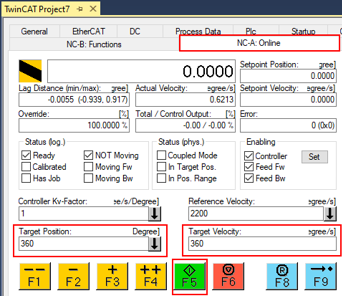
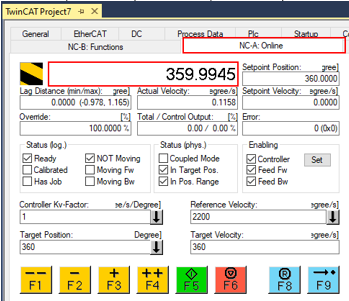
The display changes as shown below.
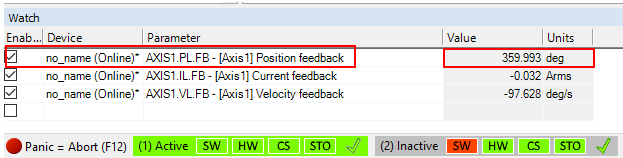
The WorkBench watch and status bar appear as shown below.
Axis 2
Repeat steps used for Axis 1 and replace NC-A Online with NC-B Online.
Jog Slow and Fast in Both Directions
Axis 1
To move, or jog, the axis in the positive or negative direction at the fast or slow manual speeds, use the following steps.
- In the tree on the left, go to the TwinCAT project > MOTION > NC-Task 1 SAF > Axes > Axis 1.
- Click the Parameter tab on the right.
- Click on the Manual Motion and Homing arrow for the options.
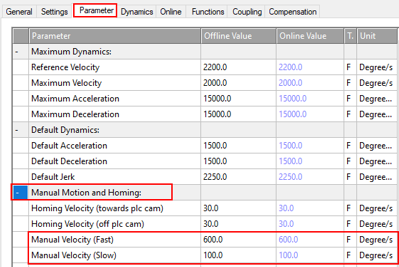
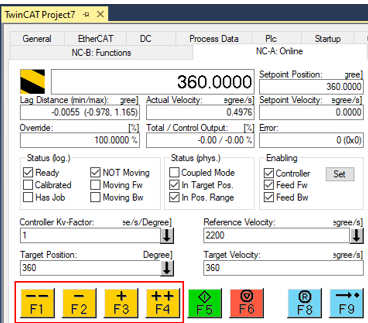
The F buttons in the NC-A Functions tab are described below.
- F1 (--) moves the axis at the fast velocity in the negative direction.
- F2 ( -) moves the axis at the slow velocity in the negative direction.
- F3 (+) moves the axis at the slow velocity in the positive direction.
- F4 (++) moves the axis at the fast velocity in the positive direction.
Axis 2
Repeat steps used for Axis 1 using Axis 2 and replace NC-A Online with NC-B Online.


