DTL_To_LDT_Local
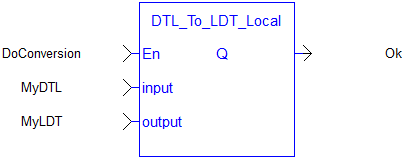
 Function - Converts a field-expanded calendar date and time (DTL), expressed in local time, to a long date and time (LDT).
- The DTL input is treated as a calendar date and time in the controller's local time zone and converted to an LDT.
- The controller's configured time zone and daylight-saving rules are applied during the conversion.
- The representable range of LDT spans from 1677-09-21 to 2262-04-11 (UTC).
- Inputs earlier than the minimum saturate output to the minimum representable value.
- Inputs later than the maximum saturate output to the maximum representable value.
- In both cases, Q is set to FALSE.
- Use LDT_To_DTL_Local to perform the reverse conversion.
- For a UTC conversion, use DTL_To_LDT_UTC.
Inputs
|
Input |
Data Type See Data Types. |
Range |
Unit |
Default |
Description |
|---|---|---|---|---|---|
|
input |
DTL |
N/A |
No default |
|
|
|
output |
LDT |
N/A |
N/A |
No default |
A variable where the LDT timestamp is written. |
Outputs
|
Output |
Data Type See Data Types. |
Range |
Unit |
Description |
|---|---|---|---|---|
|
Q |
BOOL |
FALSE, TRUE |
N/A |
|
DTL Structure Members
|
Member |
Data Type |
Range |
Description |
|---|---|---|---|
|
Year |
UINT |
1677 to 2262 |
The calendar year. |
|
Month |
USINT |
1 to 12 |
The calendar month. |
|
Day |
USINT |
1 to 31 |
The calendar day of the month. |
|
Hour |
USINT |
0 to 23 |
The hour of the day. |
|
Minute |
USINT |
0 to 59 |
The minute of the hour. |
|
Second |
USINT |
0 to 59 |
The second of the minute. |
|
Nanosecond |
UDINT |
0 to 999,999,999 |
The sub-second part, in nanoseconds. |
FBD Language Example

FFLD Language Example
IL Language Example
Not available.
ST Language Example
MyDTL.Year       := 2026;
MyDTL.Month      := 6;
MyDTL.Day        := 15;
MyDTL.Hour       := 12;
MyDTL.Minute     := 34;
MyDTL.Second     := 56;
MyDTL.Nanosecond := 123456789;

Ok := DTL_To_LDT_Local(MyDTL, MyLDT);
IF Ok THEN
   // MyLDT now holds the specified timestamp.
END_IF;


