B3 Menu Button
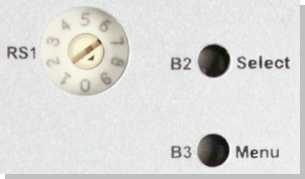
The B3 menu push-button cycles through a list of menu items displayed on the 7-segment display.
Access Functions Menu
- Press and hold the B3 button during the boot sequence.
- Each B3 press advances to the next menu item.
- The menu item is displayed for 10 seconds.
If no button is pressed within the 10 seconds, the 7-segment display returns to Normal operation.
- Press the B2 button to select the current menu item.
Application is Running
|
Functionality |
Display |
Notes |
|---|---|---|
|
Display the IP |
|
See View the Controller IP Address for more information. |
|
Stop the application |
|
This stops the KAS Runtime. |


Application is Not Running
|
Functionality |
Display |
Notes |
|---|---|---|
|
Display the IP |
|
See View the Controller IP Address for more information. |
|
Start the application |
|
This starts the KAS Runtime. |
|
Factory Reset |
|
|
|
Backup firmware to SD card |
|
See B3 Button Backup. Does not apply to PCMM2G. |
|
Restore firmware from SD card |
|
See B3 Button Restore. Does not apply to PCMM2G. |




-
-
- When selected, the Start, Stop, Backup, Restore, and Reset functions do not initiate immediately;

they require confirmation. - The 7-segment display flashes a y, prompting for confirmation.
- Press B2 to confirm the function and begin the process.
- If the function is not confirmed within 10 seconds, the action is canceled.
- When selected, the Start, Stop, Backup, Restore, and Reset functions do not initiate immediately;


