Backup the Controller
This procedure is used to replicate a PCMM2G.
The backup is stored on the USB flash drive connected to PCMM2G.
These are the elements that are backed up:
- Controller firmware.
- Date/Time - Network Time Protocol (NTP) and Set Time Zone settings.
- EtherCAT network topology.
- Kollmorgen servo drives firmware packages and their respective drive parameters.
- Network configuration.
- PLC Application.
- Retain Variables.
- Shared Directory settings.
- SSH Connection Enable/Disable configuration.
- User data files.
- See User Data tab.
- Web server and SSH user accounts configuration.
Procedure
- On the Backup tab, click the Backup Controller button.
- A confirmation message appears to continue the backup.
- Click OK to continue.
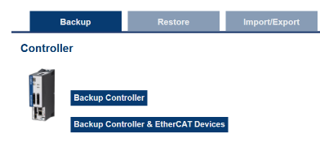
Figure 1: Backup Controller button

Figure 2: Confirmation message
-
-
- This operation cannot be performed while an application is running.
- This operation may take several minutes.
- Once started, do not power off the controller.
See Also
- EtherCAT Devices Backup
- PCMM2G Controller and EtherCAT Devices Backup


