Restore tab
-
- AKD2G FS2 and AKD2G FS3 drive’s firmware are not restored using the restore function.
Only the drive parameters and the Unique ID are restored.
See Restore EtherCAT Devices.
Restore Controller
The Backup and Restore functions are used to replicate a Kollmorgen controller.
The controller data is replicated on the PCMM2G USB flash drive.
These are the elements that are backed up or restored:
- Controller firmware.
- Date/Time - Network Time Protocol (NTP) and Set Time Zone settings.
- EtherCAT network topology.
- Kollmorgen servo drives firmware packages and their respective drive parameters.
- Network configuration.
- PLC Application.
- Retain Variables.
- Shared Directory settings.
- SSH Connection Enable/Disable configuration.
- User data files.
- See User Data tab.
- Web server and SSH user accounts configuration.
Restore Notes
- The drive's data and firmware are copied from the USB flash drive to the controller flash when the Restore Controller function is selected.
- The Restore EtherCAT Devices function should be selected for restoring the data and the firmware of any replaced Kollmorgen AKD Series Servo Drives.
-
-
- A PCMM2G backup created from any PCMM2G axis model can be restored on a different axis model.
- The restored KAS project does not run if the physical axes need for the project is more than the restored model can support.
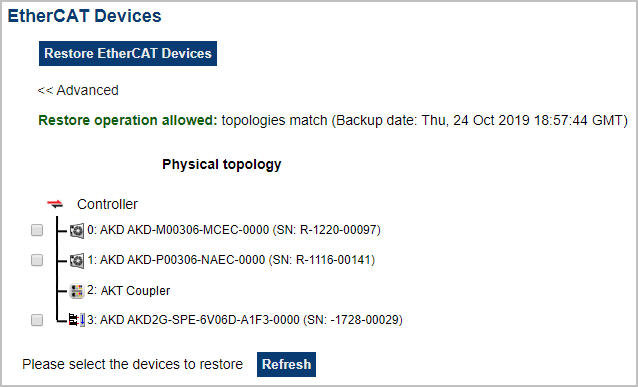
Restore EtherCAT Devices
This function automatically restores the data and firmware of any replaced AKD or AKD2G drives and the station alias of other EtherCAT devices.
Advanced
Click this button to create a map of the network and its components.
- If a valid firmware file is found, and the current topology matches the backup file, select the devices that need to be restored.
- Click Restore EtherCAT Devices to restore the drive's firmware.