Breakpoints
-
-
This feature is only available in DEBUG mode.
See Set the Compilation Options.
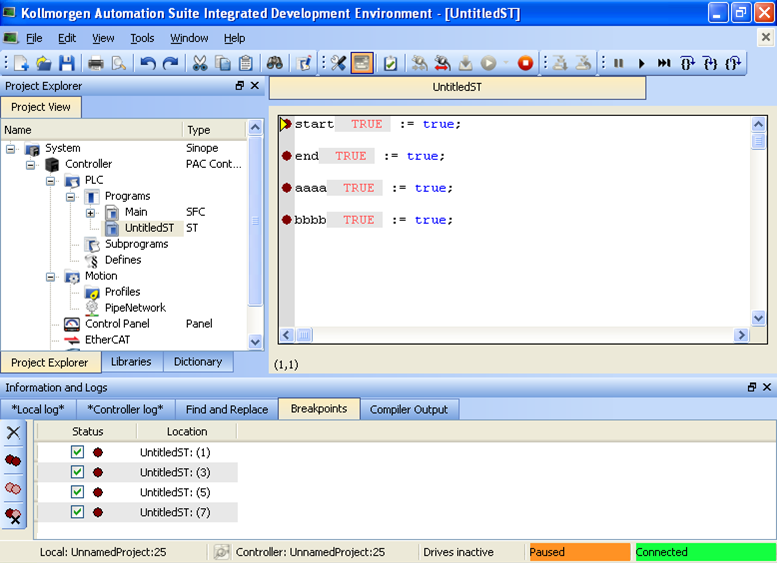
Figure 1: Example: Breakpoints tab
- Breakpoints are a marker set in code which, when reached, stops the code's execution at that location.
- This lets you run one step further in the program with stepping commands.
- This lets you run one step further in the program with stepping commands.
-
-
- Pausing a program does not interrupt the current VM cycle.
- The current cycle finishes and execution is paused before the beginning of the next VM cycle.
- Breakpoints are shown as a red circle (dark or light) in the left margin.
- Breakpoints may be active (
 ) or inactive (
 ).
).
Active or Inactive Breakpoints
- Breakpoints are active only when the KAS-IDE is connected to a target running an application that is compiled from the exact code displayed in the editor.
- Breakpoints are inactive if the KAS-IDE is:
- Not connected to a target.
- Connected but not running.
- Connected to a different version of the code.
- Connected to the code but a modification has been made in Edit mode.
Breakpoint Usage
- Breakpoints are always applied to the target, based on their position in the editor.
- If a breakpoint is moved in the editor, and you reconnect to a target, the breakpoint in the target is moved to the new position.
- A Breakpoint that has been hit has a yellow triangle (
 and
and  ) to indicate it has been reached in the code.
 - Breakpoints are saved when saving KAS and are reloaded when loading a KAS application.
- Projects support a maximum of 16 breakpoints.
- This includes both enabled and disabled breakpoints.
See:
- Set, Remove, Enable, and Disable Breakpoints about working with breakpoints.
- Breakpoints tab about information in the Information and Logs widget.
-
-
- Breakpoints can significantly increase the PLC cycle time execution.
- This is because the VM must evaluate the breakpoint condition at every cycle.
Online Change
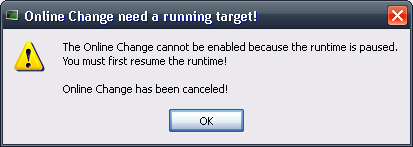
- Online Change cannot be enabled when the KAS Runtime is paused due to a breakpoint.
- Online Change can only be activated when the target is running. (Figure 2)
- Every breakpoint is activated if an Online Change is performed successfully.
-
-
Breakpoints are not activated synchronously but in a reasonable time.
- All breakpoints become inactive when an Online Change is reverted.


