
 Function Block - Defined to read and initialize the specified profile.
Selects the Cam tables by setting the pointers to the relevant tables.
Inputs
|
Input |
Data Type |
Range |
Unit |
Default |
Description |
|---|---|---|---|---|---|
|
Execute |
BOOL |
FALSE, TRUE |
N/A |
No default |
On the rising edge, request to initialize the CAM profile. |
|
CamTable |
STRING |
No range |
N/A |
No default |
Profile name as defined in the CAM Profile Properties dialog. |
|
Periodic |
BOOL |
FALSE, TRUE |
N/A |
No default |
|
|
MasterAbsolute |
BOOL |
FALSE, TRUE |
N/A |
No default |
|
|
SlaveAbsolute |
BOOL |
FALSE, TRUE |
N/A |
No default |
|
Outputs
|
Output |
Data Type |
Range |
Unit |
Description |
|---|---|---|---|---|
|
Done |
BOOL |
FALSE, TRUE |
N/A |
Indicates whether this function block has completed without error. |
|
Busy |
BOOL |
FALSE, TRUE |
N/A |
Indicates this function block is executing. |
|
Error |
BOOL |
FALSE, TRUE |
N/A |
Indicates an invalid input was specified. |
|
ErrorID |
INT |
No range |
N/A |
Indicates the error if the Error output is high. |
|
CamTableID |
INT |
0 to 255 |
N/A |
CAM table identifier used with other CAM function blocks. |
Remarks
- See Function Blocks - General Rules about how inputs and outputs work.
- Returns an ID to be used with MC_CamIn.
- See Main for information about how this function block is used in the Hole punch project.
Usage
- Each positive transition of the Enable input creates a unique Cam ID and store the profile information in a table.
- The number of unique Cam IDs is limited to 256.
- If the application attempts to create more than 256 Cam IDs:
- The Error output is TRUE.
- The ErrorID output is
22(Too Many Profiles).
- It is only necessary to call MC_CamTblSelect once for each Profile/Periodic/MasterAbsolute/SlaveAbsolute configuration to be used.
- The Periodic input specifies if the profile is to repeat each cycle.
- If the profile is not periodic and the master axis moves beyond the profile range, the slave stops at the end of the profile.
- If the master axis moves back into the profile range, the slave resumes following the profile.
- If the MasterAbsolute input is ON, the profile is in reference to the Master axis position.
- If the MasterAbsolute input is OFF, the profile is in reference to the Master axis position at the time the MC_CamIn function block is executed.
- The SlaveAbsolute input specifies if the slave positions are in reference to the Slave axis position or the Slave axis position at the time the MC_CamIn function block is executed.
- If the SlaveAbsolute input is set to TRUE, the axis jumps back to the starting position.
- If the SlaveAbsolute input is set to FALSE, the axis no longer jumps back.
- Instead, as the profile repeats, the slave moves relative to the start of each period.
FBD Language Example
Not available.
FFLD Language Example
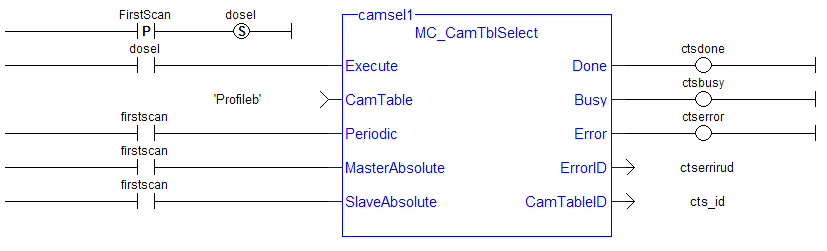
IL Language Example
Not available.
ST Language Example
(* MC_CamTblSelect ST example *) //call this function block every scan until "Done"
Inst_MC_CamTblSelect(DoSelect, 'Profileb', TRUE, TRUE, TRUE ); //Inst_MC_CamTblSelect is instance of MC_CamTblSelect
CamSelDone := Inst_MC_CamTblSelect.Done;  //store Done output to user defined variable
IF CamSelDone = TRUE THEN//when function block is "done" store
CamTableID := Inst_MC_CamTblSelect.CamTableID;  //CamTableID in user defined variable
END_IF;
See Also


