
 Function Block - Performs a slave axis move which follows the master axis using the ratio specified by RatioNumerator and RatioDenominator.
Once engaged, the slave moves RatioNumerator units for every RatioDenominator units the master moves.
Inputs
|
Input |
Data Type |
Range |
Unit |
Default |
Description |
|---|---|---|---|---|---|
|
Execute |
BOOL |
FALSE, TRUE |
N/A |
No default |
On the rising edge, request to queue the slave gear ratio move. |
|
Master |
AXIS_REF |
1 to 256 |
N/A |
No default |
Name of a declared instance of the AXIS_REF library function.
|
|
Slave |
AXIS_REF |
1 to 256 |
N/A |
No default |
AXIS_REF.AXIS_NUM is the slave axis number. See AXIS_REF Structure. |
|
RatioNumerator |
DINT |
-2147483648 to 2147483647 |
N/A |
No default |
|
|
RatioDenominator |
DINT |
-2147483648 to 2147483647 |
N/A |
No default |
|
|
Acceleration |
LREAL |
No range |
User unit/sec2 |
No default |
Trapezoidal: Acceleration rate. S-curve: Maximum acceleration. |
|
Deceleration |
LREAL |
No range |
User unit/sec2 |
No default |
Trapezoidal: Deceleration rate. S-curve: Unused. |
|
Jerk |
LREAL |
No range |
User unit/sec3 |
No default |
Trapezoidal: 0 (zero). S-curve: Constant jerk. |
|
BufferMode |
SINT |
0 to 1 |
N/A |
No default |
|
Outputs
|
Output |
Data Type |
Range |
Unit |
Description |
|---|---|---|---|---|
|
InGear |
BOOL |
FALSE, TRUE |
N/A |
Indicated the slave axis is locked on to the master axis. |
|
Busy |
BOOL |
FALSE, TRUE |
N/A |
High from the moment the Execute input goes high until the time the move is ended. |
|
Active |
BOOL |
FALSE, TRUE |
N/A |
Indicates this move is the Active move. |
|
CommandAborted |
BOOL |
FALSE, TRUE |
N/A |
If TRUE, the command was aborted by another function block. |
|
Error |
BOOL |
FALSE, TRUE |
N/A |
Indicates either:
|
|
ErrorID |
INT |
No range |
N/A |
Indicates the error if Error output is TRUE. |
Remarks
SlaveCommandPosition = MasterActualPosition * RatioNumerator / RatioDenominator
-
- This function block starts a motion-related action and stores data for calculations and error checking.
If using a dual-core controller, see Program a Multi-Core Controller.
- See Function Blocks - General Rules about how inputs and outputs work.
- When this command is executed, the slave axis accelerates or decelerates (using the Acceleration, Deceleration, and Jerk) to the target velocity determined by the master axis velocity and the ratio.
- When the slave axis reaches a velocity within the In Gear bandwidth around the target velocity, it locks on to the master, and the InGear output goes high.
- See Axis Parameters.
- When the slave is locked to the master, the slave motion is no longer affected by the acceleration, deceleration, and jerk inputs.
- Example: If the In Gear bandwidth is set to 0.1 User unit/sec, the InGear output turns on if the slave velocity is within +/- 0.1 User unit/sec of the target velocity.
- The slave axis continues to follow the master axis until this move is aborted.
- See Main about how this function is used in the Hole punch project.
Aborting Gearing
Gearing functions can generate large accelerations while following the master.
- If the aborting function block has small, non-zero Jerk, or small acceleration values, it can take a long time for an accelerating axis to reach the target velocity, or position of the aborting function block.
- If the Jerk and/or acceleration of the aborting function cannot be increased to suitable values, it may be desirable to either:
- Abort the gearing function with an MC_GearOut with higher accelerations and/or Jerk values (or zero jerk value).
- Execute the next MC motion function block (e.g., MC_Halt).
- If the Jerk and/or acceleration of the aborting function cannot be increased to suitable values, it may be desirable to either:
Time to Reach the Target Velocity
While following the master, gearing functions can generate large accelerations.
- If the gearing function is aborted while the axis is currently accelerating, and the aborting function block has small non-zero Jerk or small acceleration values, it can take a long time to reach the target velocity, or position of the aborting function block.
- If the Jerk and/or acceleration of the aborting function cannot be increased to suitable values, it may be desirable to either:
- Abort the gearing function with an MC_GearOut with higher accelerations and/or Jerk values (or zero jerk value).
- Execute the next MC motion function block (e.g., MC_Halt).
- If the Jerk and/or acceleration of the aborting function cannot be increased to suitable values, it may be desirable to either:
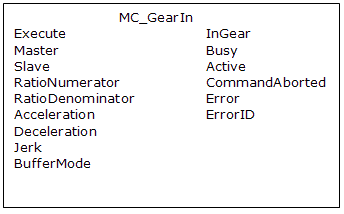
Figure 1: MC_GearIn
Time Diagram
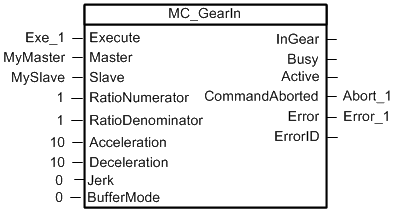
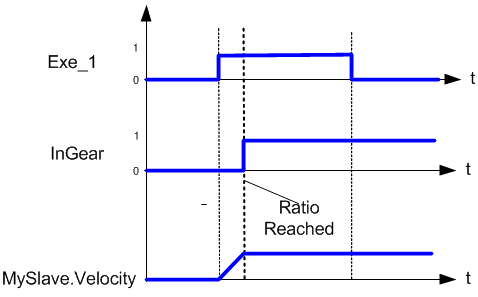
Figure 2: Time Diagram
FBD Language Example
Not available.
FFLD Language Example
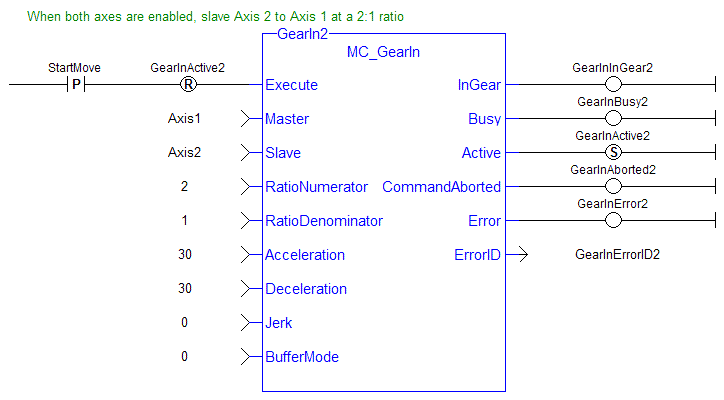
IL Language Example
Not available.
ST Language Example
(* MC_GearIn ST example *)
   Inst_MC_GearIn( GearInReq, Axis1, Axis2, 2, 1, 150.0, 150.0, 0, 0 );
//Inst_MC_GearIn is an instance of MC_GearIn


