
 Function Block - Performs a master position phase shift for the slave axis.
Inputs
|
Input |
Data Type |
Range |
Unit |
Default |
Description |
|---|---|---|---|---|---|
|
Execute |
BOOL |
FALSE, TRUE |
N/A |
No default |
On the rising edge, request to queue the phase shift. |
|
Master |
AXIS_REF |
1 to 256 |
N/A |
No default |
Name of a declared instance of the AXIS_REF library function.
|
|
Slave |
AXIS_REF |
1 to 256 |
N/A |
No default |
|
|
PhaseShift |
LREAL |
No range |
User units |
No default |
Amount of phase shift. |
|
Velocity |
LREAL |
No range |
User unit/sec |
No default |
Velocity setpoint. |
|
Acceleration |
LREAL |
No range |
User unit/sec2 |
No default |
|
|
Deceleration |
LREAL |
No range |
User unit/sec2 |
No default |
|
|
Jerk |
LREAL |
No range |
User unit/sec3 |
No default |
|
|
BufferMode |
SINT |
0 to 5 |
N/A |
No default |
|
Outputs
|
Output |
Data Type |
Range |
Unit |
Description |
|---|---|---|---|---|
|
Done |
BOOL |
FALSE, TRUE |
N/A |
Indicates the phase shift has been completely applied. |
|
Busy |
BOOL |
FALSE, TRUE |
N/A |
If TRUE, the function block is executing. |
|
Active |
BOOL |
FALSE, TRUE |
N/A |
If TRUE, the function block is controlling motion. |
|
CommandAborted |
BOOL |
FALSE, TRUE |
N/A |
If TRUE, the command was aborted by another function block. |
|
Error |
BOOL |
FALSE, TRUE |
N/A |
If TRUE, an error has occurred. |
|
ErrorID |
INT |
No range |
N/A |
|
Remarks
-
- This function block starts a motion-related action and stores data for calculations and error checking.
If using a dual-core controller, see Program a Multi-Core Controller.
- See Function Blocks - General Rules about how inputs and outputs work.
- See Main about how this function is used in the Hole punch project.
This function block:
- Provides a way to smoothly apply a master offset instead of writing values directly to the Master Offset Parameter 1002.
- Is commonly used with MC_TouchProbe for performing position corrections on the slave axis in a Mark-to-Mark registration application.
-
- MC_Phasing performs a similar function to adjusting the MasterOffset input in the MC_CamIn function block.
It has the additional features of setting the velocity, acceleration, deceleration, and jerk motion parameters.
- The distance entered at the PhaseShift input is iterated into the Slave axis’s Master Offset.
- This distance is iterated like a MC_MoveRelative move using the specified Velocity, Acceleration, Deceleration, and Jerk values.
- The difference is the interpolated command delta is not commanded to the axis but is added to the Slave axis’s Master Offset.
- This shifts the Master axis’s position as viewed by the Slave axis, causing a change in the Slave axis’s physical position.
- This only affects the Slave axis if it is executing a slave move.
- Subsequent calls to MC_Phasing can abort or blend to an executing MC_Phasing command.
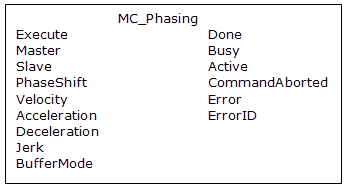
Figure 1: MC_Phasing
FBD Language Example
Not available.
FFLD Language Example
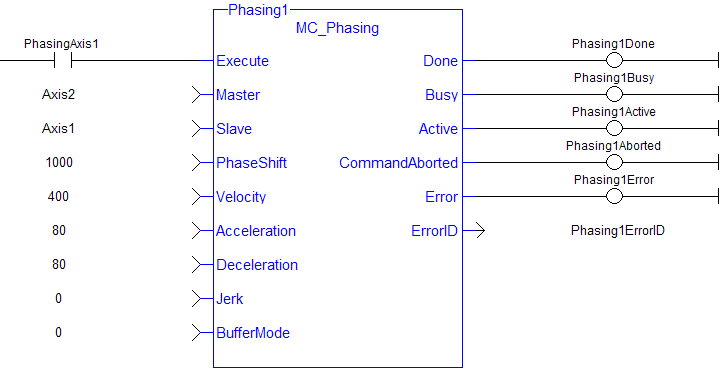
IL Language Example
Not available.
ST Language Example
(* MC_Phasing ST example *) //Inst_MC_Phasing is an instance of MC_Phasing function block
Inst_MC_Phasing(PhasingAxis1, Axis2, Axis1, 1000.0,100.0, 200.0, 200.0, 0, 0 );


