MLCamInit

 Function - Initializes a CAM Pipe Block for use in a PLC Program.
Inputs
|
Input |
Data Type |
Range |
Unit |
Default |
Description |
|---|---|---|---|---|---|
|
BlockID |
DINT |
1 to 1024 |
N/A |
No default |
ID number of a created Pipe Block. |
|
ProfileName |
STRING |
No range |
N/A |
No default |
|
|
ModuloPosition |
LREAL |
0 to 1.0x10300 |
User units |
No default |
|
Outputs
|
Output |
Data Type |
Range |
Unit |
Description |
|---|---|---|---|---|
|
Default (.Q) |
BOOL |
FALSE, TRUE |
N/A |
|
Remarks
This function is automatically called if a CAM Block is added to the Pipe Network, with user-defined settings then entered in the Pipe Blocks Properties screen.
- The CAM Pipe Block is used to generate motion profiles of any shape.
- These profiles are created and initiated separately and the shape is modified with the CAM Editor.
- With the Editor profiles can be changed graphically or by manually changing values in a numeric table relating input and output values with specific slopes.
- The CAM Editor software tool provides the capability to visualize, analyze, edit, and smooth profiles.
With the Pipe Network (PN) CAM block:
- The CAM block’s profile is in reference to the input positions coming into the PN CAM block (Master Absolute)
- The PN CAM block output positions are in reference to PN CAM block’s output position at the end of the last CAM cycle (Slave Relative).
- Profile switching can be done on the fly, without losing synchronization and without dead time.
- In addition, the offsets and ratios of CAM Profiles can be changed on the fly.
- See CAM Profile Switching for more information.
-
-
- CAM objects are normally created in the Pipe Network using the graphical engine.
- You do not have to add MLCamInit function blocks to their programs.
- Parameters are entered directly in pop-up windows and the code is automatically added to the current project.
FBD Language Example
FFLD Language Example
IL Language Example
Not available.
ST Language Example
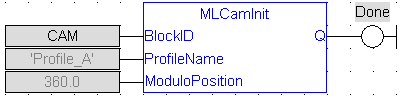
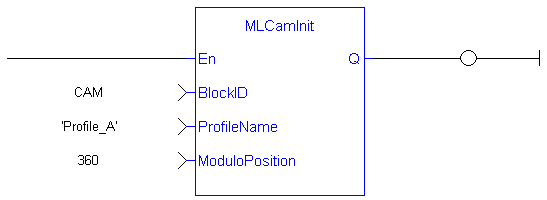
//Initialize  a Pipe Network block named “CAM” with a profile named “Profile_A”, set the cam modulo position to 360
CAM := MLBlkCreate( 'CAM', 'CAM' );
MLCamInit( CAM, 'Profile_A', 360.0 );
See Also


