Add the Controller
- Click the File menu and select New.
The Controller Creation Wizard opens.
The Choose controller type dialog box is active. - Select the type of controller for the project.
- Click Next.
The Choose an application template dialog box opens. - In the Template type area, choose the motion engine option
- In the template list, select the application template.
See the Available Application Templates list). - Click Finish.
The wizard closes. - Click the File menu and select Save As.
The Save As dialog box opens. - Define the Project Name and its location.
- Click OK to save the changes or selections and close the dialog box.
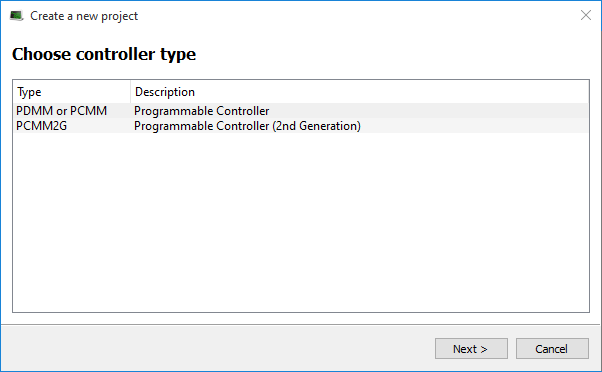
Figure 1: Choose controller type dialog box
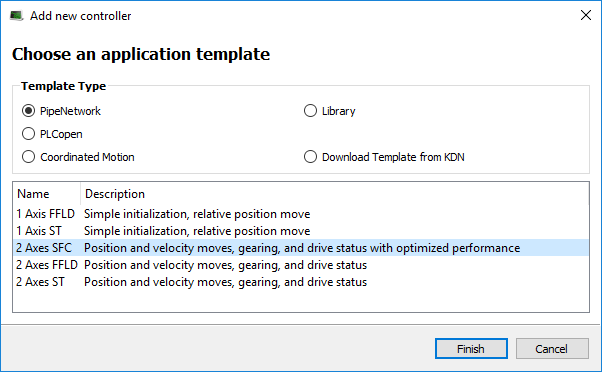
Figure 2: Choose an application template dialog box
Available Application Templates
 List of available application templates
Coordinated Motion
|
Template Name |
Description |
|---|---|
|
|
|
|
|
KAS Runtime
|
Template Name |
Description |
|---|---|
|
Library |
Used to create a custom library. |
KDN Download
|
Template Name |
Description |
|---|---|
|
KDN |
Pipe Network
|
Template Name |
Description |
|---|---|
|
Simple initialization, relative position move. |
|
|
Simple initialization, relative position move. |
|
|
Position and velocity moves, gearing, camming, and drive status. |
|
|
Position and velocity moves, gearing, camming, and drive status. |
|
|
Position and velocity moves, gearing, camming, and drive status with optimized performance. |
PLCopen
|
Template Name |
Description |
|---|---|
|
Simple initialization, relative position move. |
|
|
Simple initialization, relative position move. |
|
|
Position and velocity moves, gearing, camming, and drive status. |
|
|
Position and velocity moves, gearing, camming, and drive status. |
|
|
Position and velocity moves, gearing, camming, and drive status with optimized performance. |


