 MLBlkCreate

| Name | Description | Return type |
| MLBlkCreate | Creates a new Pipe Block object | None |
| MLBlkIsReady | Checks if a Pipe Block currently has a function running | BOOL |
| MLBlkReadModPos | Gets the value of the period of a block in user units | None |
| MLBlkReadOutVal | Gets the output value of a selected Pipe Block | None |
| MLBlkWriteModPos | Sets the value of the period of a block in user units | BOOL |
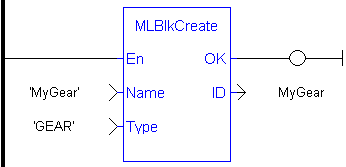
MLBlkCreate
Pipe Blocks are normally created in the Pipe Network using the graphical engine. Then you do not have to add MLBlkCreate function blocks to their programs. Blocks are created graphically, and the code with MLBlkCreate commands are automatically generated and called in a program with Pipe Network(MLPN_CREATE_OBJECTS).
This function must be called or executed before MLMotionStart is called.
|
Name |
Description |
Desired name for the newly created Pipe Block |
|
Data type |
String |
|
|
Range |
— |
|
|
Unit |
n/a |
|
|
Default |
— |
|
|
Type |
Description |
Type of Pipe Block to create (ex. MASTER, GEAR, PHASER, etc.) |
|
Data type |
String |
|
|
Range |
— |
|
|
Unit |
n/a |
|
|
Default |
— |
|
ID |
Description |
Assigned ID number of the created Block |
|
Data type |
DINT |
|
|
Unit |
n/a |
|
|
Default |
— |
PipeNetwork(MLPN_CREATE_OBJECTS)
//Create a new  GEAR Pipe Block named “MyGear”
MyGear := MLBlkCreate( 'MyGear', 'GEAR' );

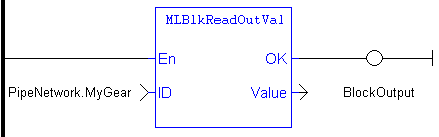
MLBlkReadOutValGet the output value a selected Pipe Block.
|
ID |
Description |
ID number of a created Pipe Block |
|
Data type |
DINT |
|
|
Range |
[-2147483648, 2147483648] |
|
|
Unit |
n/a |
|
|
Default |
— |
|
Value |
Description |
Current output value of the selected Pipe Block |
|
Data type |
LREAL |
|
|
Unit |
n/a |
|
|
Default |
— |
|
//Save the output of a Gear Pipe Block BlockOutput := MLBlkReadOutVal( PipeNetwork.MyGear );
|

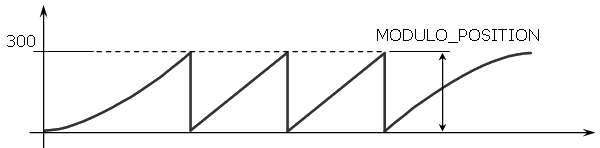
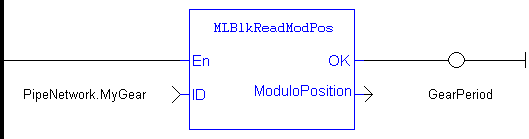
MLBlkReadModPosGet the value of the period of a block in user units. The output value of a block is reset each time it reaches its period value.
|
ID |
Description |
ID number of a created Pipe Block |
|
Data type |
DINT |
|
|
Range |
[-2147483648, 2147483648] |
|
|
Unit |
n/a |
|
|
Default |
— |
|
ModuloPosition |
Description |
Current Period Value for selected Pipe Block |
|
Data type |
LREAL |
|
|
Unit |
User unit |
|
|
Default |
— |
|
//Return and save the Period of a Pipe Block GearPeriod := MLBlkReadModPos( PipeNetwork.MyGear );
|

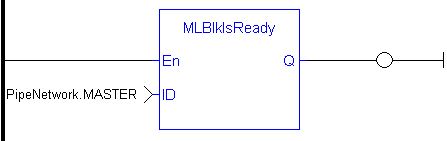
MLBlkIsReadyCheck if a block is ready. Returns FALSE if the selected Pipe Block has a function running. Returns TRUE if no function of a specified Pipe Block is running.
Same return value as the .Q output of a specific function itself
|
ID |
Description |
ID number of a created Pipe Block |
|
Data type |
DINT |
|
|
Range |
[-2147483648, 2147483648] |
|
|
Unit |
n/a |
|
|
Default |
— |
|
Default (.Q) |
Description |
Returns TRUE if no function of a specified Pipe Block is running. See more details here |
|
Data type |
BOOL |
|
|
Unit |
n/a |
BOOL
//Check if the MST Pipe Block named “MASTER” has a function running
IsReady := MLBlkIsReady( PipeNetwork.MASTER );

MLBlkWriteModPosSet the value of the period of a block in user units. The output value of a block is reset each time it reaches its period value.
|
ID |
Description |
ID number of a created Pipe Block |
|
Data type |
DINT |
|
|
Range |
[-2147483648, 2147483648] |
|
|
Unit |
n/a |
|
|
Default |
— |
|
|
ModuloPosition |
Description |
Desired new Period Value for selected Pipe Block |
|
Data type |
LREAL |
|
|
Range |
— |
|
|
Unit |
User unit |
|
|
Default |
— |
|
Default (.Q) |
Description |
Returns TRUE if the function block executes See more details here |
|
Data type |
BOOL |
|
|
Unit |
n/a |
BOOL
|
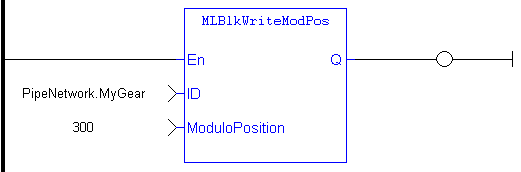
//Set the Period of a Pipe Block to 300 MLBlkWriteModPos( PipeNetwork.MyGear, 300 );
|

|
Stay Connected with Kollmorgen       
|
Copyright © 2015 Kollmorgen™ |

|
 [Top]