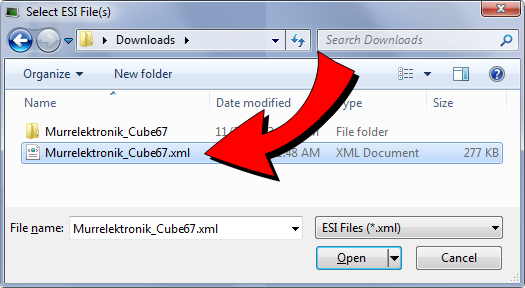
ESI files may contain references to other ESI files or to EDS files. The referenced files may be located in the same directory or sub-directories. ESI files with references are common with MDP (Modular Device Profile) devices. This is because the ESI files for the modules are shared between several device Products and/or Revision Numbers.
When adding an ESI file with references to the IDE"Integrated development environment" An integrated development environment is a type of computer software that assists computer programmers in developing software. IDEs normally consist of a source code editor, a compiler and/or interpreter, build-automation tools, and a debugger’s ESI library, only add the top-level file that contains the references to the other files and sub-directories. The IDE will check the selected ESI file for reference files and automatically add the reference files.
For example, when adding the Murrelektronik Cube67 MDP (modular) device ESI file, select the top-level ESI file.
Do not select the lower-level module ESI files found in a sub-folder.
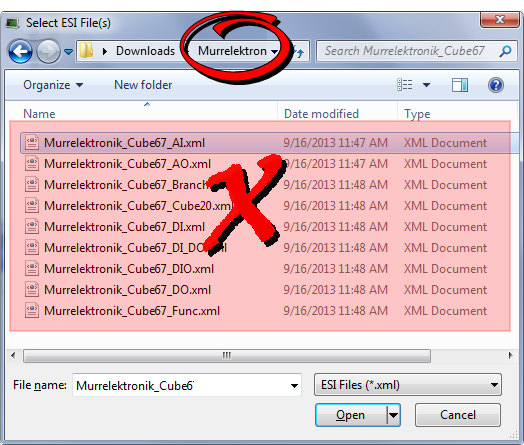
WARNING: Always add the top-level ESI file to the IDE’s ESI library. Do not add, delete, or upgrade lower-level module files to the IDE’s ESI library. Removing or replacing lower-level files may cause unexpected or unknown behavior. If any reference files are missing when the top-level file is added to the IDE’s ESI library, an error message will notify you which sub-files are missing.
|
Stay Connected with Kollmorgen       
|
Copyright © 2015 Kollmorgen™ |

|