You are here: Using the PDMM or PCMM Controller > Working with the Hardware > EtherCAT Devices Backup and Restore > Export/Import EtherCAT Devices Backup

Export/Import EtherCAT Devices Backup

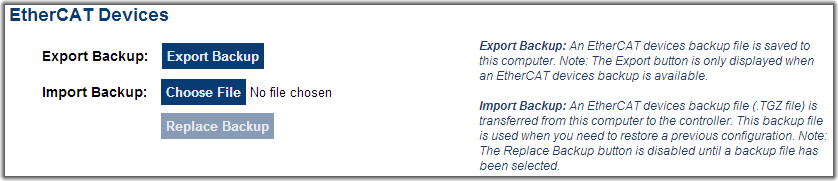
A network backup may be exported and imported. The export procedure saves a backup file to the computer running the web browser. The import procedure allows you to transfer a backup file onto the controller to be used later for restoring a previous configuration.

Export Procedure

  1. Click on the "Export Backup" button. The browser starts transferring a backup file. Depending upon the browser being used, this may involve a prompt confirming that you wish to receive the file.
  2. You may move the file to a different directory once the file is saved. The file may be renamed to help identify the backup file with the machine.

Import Procedure

  1. Specify a backup file to import by clicking on the "Browse" button. This backup file will be used to replace the current backup on the controller.
  2. After a backup file is specified, click on the "Replace Backup" button. This creates a backup on the controller with the data stored in the specified backup file. Any previously existing backup will be replaced. If the import fails, the previous backup will not be replaced.


Stay Connected with Kollmorgen

Copyright © 2015 Kollmorgen™
