Open topic with navigation
Working with the Hardware
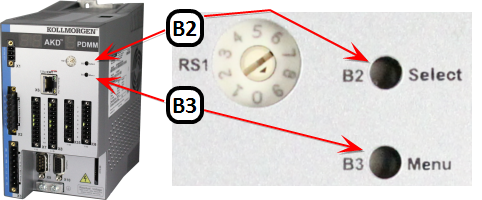 In some cases, using the buttons on the controller may be preferable to using the web server. On the front of the controller there are two buttons, B2 and B3. B2 is above B3. These buttons may be used to enter Recovery Mode (see "Booting from the Recovery Image"), Display the IP Address of a PDMM or PCMM, stop and start the application, reset the control to factory settings (see "Reset the Control to Factory Settings"), and backup/restore the firmware.
Table 7-1: B2/B3 button functionality at start-up
Table 7-2: B2/B3 button functionality while running
|
|
Copyright © 2015 Kollmorgen™
|
|

|
Open topic with navigation


