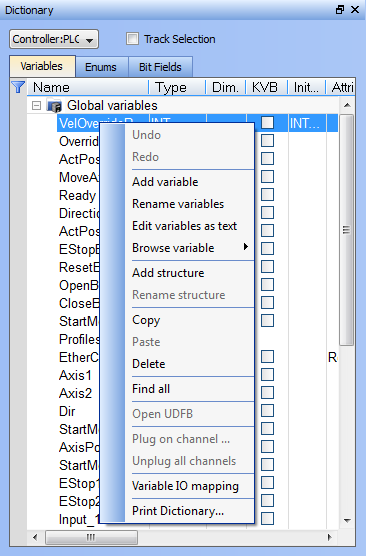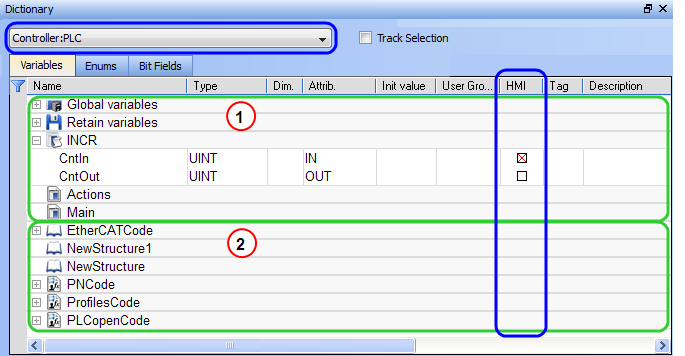
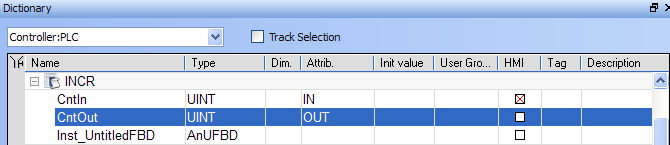
Figure 3-5: Dictionary Toolbox
The list of variables is split into two parts:


For more information about the procedure to create an instance of a structure, see "Call Functions or Function Blocks"
To show all the variables of all programs, select 'PLC"Programmable Logic Controller" A Programmable Logic Controller, PLC, or Programmable Controller is a digital computer used for automation of industrial processes, such as control of machinery on factory assembly lines. Used to synchronize the flow of inputs from (physical) sensors and events with the flow of outputs to actuators and events' in the project tree.
 What is the purpose of the Track Selection check box?
The Track Selection filters the displayed items in the dictionary to show only items linked to the current PLC selected program:
About the two editing modes for editing a variable.
There are two available modes when editing a variable in the Dictionary:
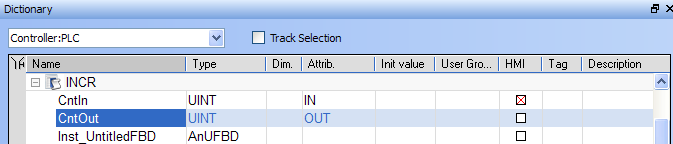
Press Spacebar to toggle the selection mode from cell to row (Table Keyboard Shortcuts).
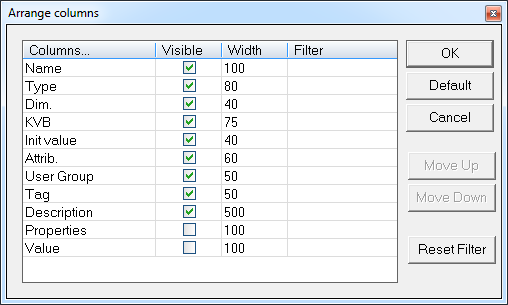
How can variables be arranged and/or sorted?
 How do I modify parameters of a variable?
(Press Spacebar to toggle to the relevant edition mode).
| Mode | Description |
|---|---|
| One Parameter | Assuming you are in the cell edition mode, double-click on the parameter |
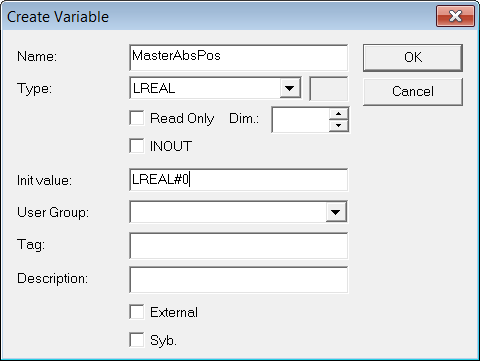
| All the parameters are at the same time | Assuming you are in the row edition mode, double-click in any parameter to open the dialog box for variable configuration as shown below.
Figure 3-7: Configure the Variable For more details on parameters, see "Variables". |
It is not possible to modify a variable when the KAS IDE"Integrated development environment" An integrated development environment is a type of computer software that assists computer programmers in developing software. IDEs normally consist of a source code editor, a compiler and/or interpreter, build-automation tools, and a debugger is connected to the controller.
|
Stay Connected with Kollmorgen       
|
Copyright © 2015 Kollmorgen™ |

|