To Perform an Absolute Linear Move
Call MC_MoveLinAbs (Execute, AxesGroup, PositionArray, Velocity, Acceleration, Deceleration, JerkIn physics, jerk is the rate of change of acceleration; more precisely, the derivative of acceleration with respect to time, CoordSystem, BufferMode, TransitionMode, TransitionParameter). PositionArray is an array of absolute end positions containing one position for each axis in the group. The inputs velocity, acceleration, deceleration, and jerkIn physics, jerk is the rate of change of acceleration; more precisely, the derivative of acceleration with respect to time establish the maximum values for the move.
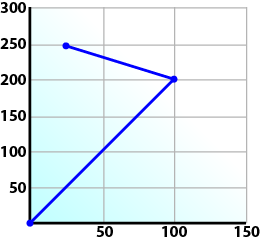
In this example, PosArrayAbs[0] represent the x-axis and PosArrayAbs[1] represent the y-axis.
PosArrayAbs[0] := 100;
PosArrayAbs[1] := 200;
TransParam[0]  :=   0;
TransParam[1]  :=   0;

Inst_MC_MoveLinRel(TRUE, Group1_ref, PosArrayAbs, MaxVel, MaxAcc, MaxDec, 0, MC_COORDINATE_SYSTEM_ACS, 1, 0, TransParam);
In the example a linear move will be performed on axis group 'Group1_ref'.
- PosArrayAbs contains the absolute end points of the axes in the group. The axis stored in position 0 (IdentInGroup) of the group will be moved to 100.0. The axis stored in postiion 1 of the group will be moved to 200.0.
- The maximum velocity is specified by variable MaxVel and is specified in 'user units/sec'.
- The maximum acceleration and deceleration are specified by variables MaxAcc and MaxDec and are specified in 'user units/sec2'.
- The maximum jerk is currently not supported and can be set to a value of 0.
- The coordinate system is ACS
- The BufferMode is set to 1, indicating the move is buffered. For more information about buffer modes, see the Buffer Modes overview.
- The TransitionMode is set to 0, indicating no transition mode will be used. For more information about transition modes, see the Transition Between Moves section.
- The TransParam array is required and the contents can be set to 0 since the transition mode is not being used. There has to be one array entry for each axis in the group.
To Perform a Relative Linear Move
Call MC_MoveLinRel (Execute, AxesGroup, Distance, Velocity, Acceleration, Deceleration, Jerk, CoordSystem, BufferMode, TransitionMode, TransitionParameter). The Distance input is an array of distances, one distance for each axis in the group. The inputs velocity, acceleration, deceleration, and jerk establish the maximum values for the move.
In this example, DistArrayRel[0] represent the x-axis and DistArrayRel[1] represent the y-axis.
DistArrayRel[0] := -75.0;   // Start pt 100 – rel 75 ->  25 absolute end pt
DistArrayRel[1] :=  50.0;   // Start pt 200 + rel 50 -> 250 absolute end pt
TransParam[0]   :=   0;
TransParam[1]   :=   0;

Inst_MC_MoveLinRel(TRUE, Group1_ref, DistArrayRel, MaxVel, MaxAcc, MaxDec, 0, MC_COORDINATE_SYSTEM_ACS, 1, 0, TransParam);
In the example above, all the variables have the same meaning as the absolute linear example except DistArrayRel. DistArrayRel contains the relative distance to move for each axis in the group. The axis stored in position 0 (IdentInGroup) of the group will be moved a distance of -75.0. The axis stored in postiion 1 of the group will be moved a distance of 50.0.
To Perform a Linear Move With More Than Two Axes
-
-
The dimensionality of the move is determined by the number of axes mapped to the group. This implies that a group which could hold a maximum of three or more axes will do two dimensional moves if it only has two valid axes mapped to it.
In order to perform higher dimensional moves, additional axes must be added to the group. The steps to do this are detailed in Create a Linear or Circular Coordinated Motion Application.
After the additional axes are added perform the following steps.
- From within the Dictionary, update the array size of the variable being passed (PosArrayAbs and DistArrayRel in the examples above) to the Position input so that its length matches the maximum number of axes allowed in the group.
- Set the desired values for the additional axes in the now larger position arrays.


