You are here: Advanced Topics > Coordinated Motion > How-To: Coordinated Motion > Blending with Transitions

Blending with Transitions

When blending is specified when a transition is specified, then the blending mode is used to blend velocities of path segments when the path changes from the incoming segment to the transition segment and from the transition segment to the outgoing segment.

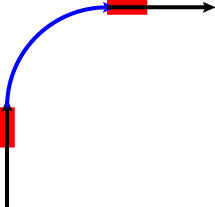
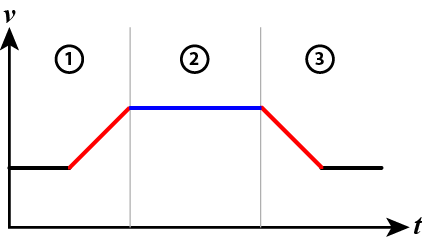
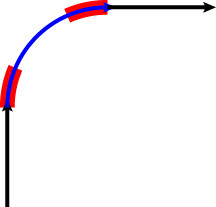
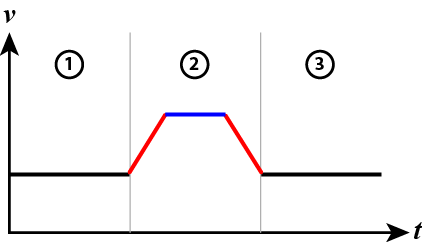
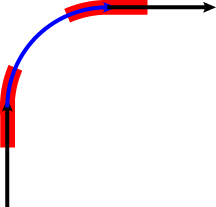
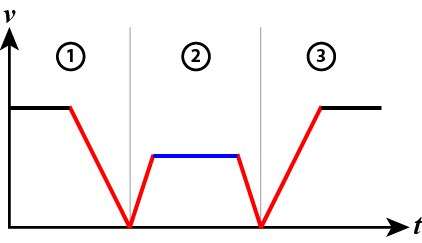
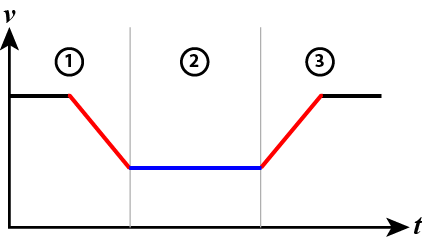
The most common blending mode choices for applications are listed below showing the velocity profile and where acceleration occurs on the path. In the examples, blue denotes the transition arc, red denotes where the acceleration occurs, 1 indicates the incoming move, 2 indicates the transition, and 3 indicates the outgoing move.

  Example Profile
MC_BUFFER_MODE_BLENDING_BUFFERED

MC_BUFFER_MODE_BLENDING_HIGH

When the transition velocity is smaller than the incoming and outgoing move velocities.
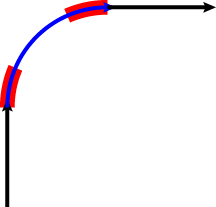
MC_BUFFER_MODE_BLENDING_LOW

When the transition velocity is smaller than the incoming and outgoing move velocities.
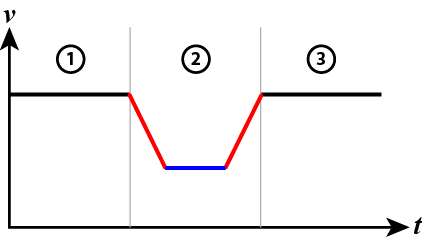
MC_BUFFER_MODE_BLENDING_HIGH

When the transition velocity is larger than the incoming and outgoing move velocities.
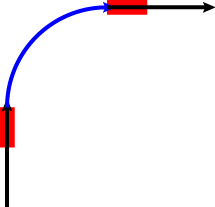
MC_BUFFER_MODE_BLENDING_LOW

When the transition velocity is larger than the incoming and outgoing move velocities.


Stay Connected with Kollmorgen

Copyright © 2015 Kollmorgen™