 ECATWriteData
 ECATWriteData
This is a low level function and it should only be used carefully by advanced users.
Modify the EtherCATEtherCAT is an open, high-performance Ethernet-based fieldbus system. The development goal of EtherCAT was to apply Ethernet to automation applications which require short data update times (also called cycle times) with low communication jitter (for synchronization purposes) and low hardware costs process image by directly writing values in it.
If you have a device other than the drive, ECATWriteData is used for more than just debug. It is used to set the status of the module (e.g. Stepper I/O slice) in the case your project is based on an external XML"Extensible Markup Language " XML is a general-purpose markup language. It is classified as an extensible language because it allows its users to define their own tags file because it contains unsupported EtherCAT Device.
| Offset | Description | Offset in bytes from the beginning of the frame |
| Data type | UINT | |
| Range | 0 - 1500 | |
| Unit | bytes | |
| Default | — | |
| Nbytes | Description | Number of bytes to write |
| Data type | SINT | |
| Range | 1, 2 or 4 | |
| Unit | bytes | |
| Default | — | |
| Value | Description | Value to be written in the image. Only the number of bytes specified by Nbytes is copied. |
| Data type | DINT | |
| Range | [-2147483648, 2147483648] | |
| Unit | n/a | |
| Default | — |
|
Default (.Q) |
Description | True if data was written See more details here |
| Data type | BOOL | |
| Unit | n/a |
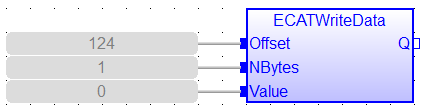
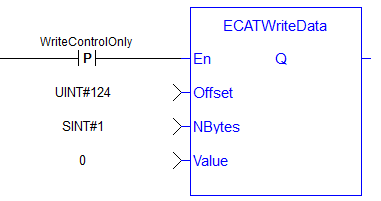
//For use with Kollmorgen Thermocouple slice I/O to read in deg C
//Lookup offset by exporting ENI file after EtherCAT network is scanned
//Use offst 124 (byte) to write 0 in control word to allow temperature to be shown on status byte

ON WriteControlOnly DO
ECATWriteData( 124, 1, 0 );
END_DO
|
Stay Connected with Kollmorgen       
|
Copyright © 2015 Kollmorgen™ |

|
 [Top]
[Top]