Double-click the Dictionary header to display the widget as a popup window in order to have more space.
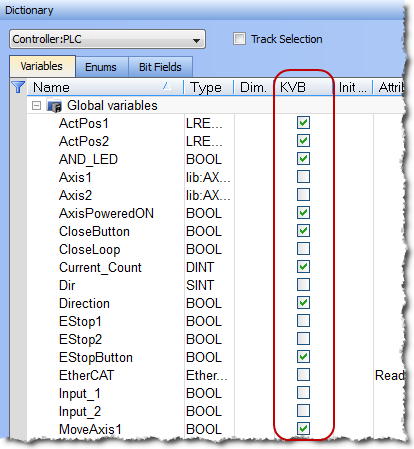
Figure 4-30: Variable Mapping to KVB.
-
-
Selecting the variable alone does not guarantee it will be exported. The POU"Programmable Organization Unit" An application is a list of programs. Programs are executed sequentially within the target cycle according to the order defined by the user and displayed in the Project View must be set to compile as well. See Ensuring Variables are Exported for more information.
-
-
Being based on ModbusModBus is a serial communications protocol and is now the most commonly available means of connecting industrial electronic devices. ModBus is often used to connect a supervisory computer with a remote terminal unit in supervisory control and data acquisition (SCADA) systems. Versions of the ModBus protocol exist for serial port and Ethernet (it is widely used with TCP/IP over Ethernet), the communication is limited to 32 bits. As a consequence:
- Data type conversion can lead to a loss in accuracy:
- LREAL variables are saved as REAL
- LINT variables are converted to DINT
- ULINT variables are saved as UDINT
- LWORD data types cannot be used within the HMI when using KVB. This is because variables of this type are not exported, even when selected.
- STRING variable data types are allowed in the HMI when using KVB 2.0 or later (they are not supported in KVB 1.2). String variables allow up to 240 characters.
- Variables of types "PNCode", "ProfilesCode", or instances of UDFB"User Defined Function Block" UDFB can be used as a sub-function block in another program of the application. It is described using FBD, LD, ST or IL language. Input / output parameters of a UDFB (as well as private variables) are declared in the variable editor as local variables of the UDFB cannot be used within the HMI.
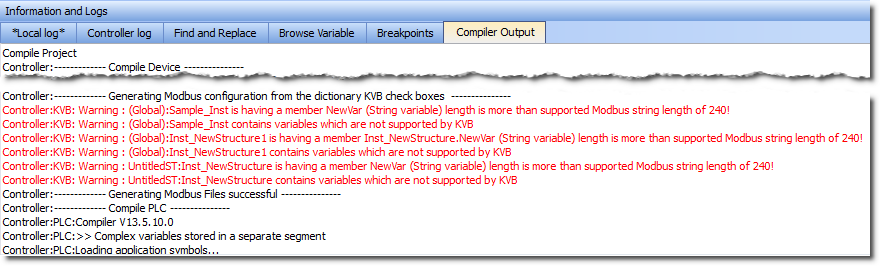
- String variables whose size exceed the maximum string length of 240 characters generate a warning message in the Compiler Output window when being exported over Modbus. Only the first 240 characters will be exported. See Compiler Output for more information.
- Data type conversion can lead to a loss in accuracy:
-
-
Non-primitive data types which are not exported over Modbus generate a warning message in the Compiler Output window. See Compiler Output for more information.
Generally you do not need to access this, but if you do the file used for manually importing variables into KVB (named HMI Variable Import File.txt) is located in the following location.
- Windows 7: C:\Users\(user)\AppData\Local\Kollmorgen\KAS\Project
- Windows XP: C:\Documents and Settings\(user)\Local Settings\Application Data\Kollmorgen\KAS\Project
- If you modify the set of tagged variables in the dictionary, you have to update the text file by recompiling the project.
- The Modbus variables defined in KAS IDE"Integrated development environment" An integrated development environment is a type of computer software that assists computer programmers in developing software. IDEs normally consist of a source code editor, a compiler and/or interpreter, build-automation tools, and a debugger are imported in Kollmorgen Visualization Builder only when you start KVB (there is no update in real-time between the two applications).
 See Also


