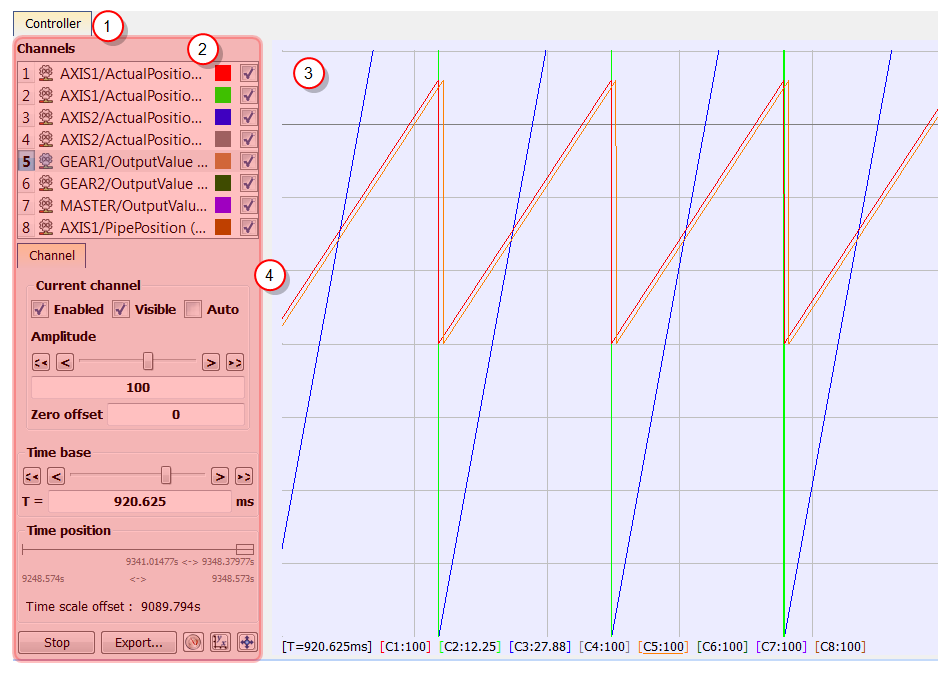
As shown on the figure below, the scope has a set of channels where each can acquire the evolution of a value. A value can be the feedback position of an axis, the speed of a machine, or anything else that can be measured with the softscope probes (for more details on how to attach a variable, see "Plugging Probes").
The soft oscilloscope is a window where the tab's name is the controller's name (see call out  ). This scope view has two visually distinct parts:
 enables you to change the settings of the soft oscilloscope (including those of the channels)
 shows the traces acquired by the channels
The control panel and the graph are separated by a splitter 
You can hide the Control Panel for the best user experience with a drag-and-drop operation.
How to access the softscope view?
In order to access the softscope view, select the Oscilloscope command from the Tools menu.
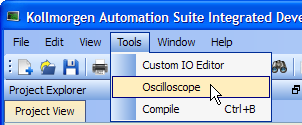
Figure 10-18: Accessing the Scope
For the Graphical Area, the scope uses OpenGL for performance reasons. It does not work under Windows XP Embedded (which has no OpenGL libraries installed by default). On other systems, if you encounter problems in the quality of drawings, we suggest that you consider the following points before contacting our support desk:
 Check that your graphical card driver is up-to-date.
Newer drivers often fix the rendering bugs of OpenGL.
Disable some optimizations on the Display hardware acceleration
Open Display PropertiesThe Properties command is accessible in the contextual menu on your desktop (you can also access the Display from the Windows Control Panel). In the Settings tab, click the Advanced button, then select the Troubleshoot tab. If Hardware acceleration is set to full, try to disable some optimizations. This procedure has proven to be useful in particular with cursor drawing problems that appear when the user performs high-zooming operations (the cursor can indicate a value which is out of the trace).
Change the settings of your graphic card
Open the manufacturer-specific settings of your graphic card. If there are some settings related to Performance and quality, try to set them to quality (but not high quality) instead of performance, at least for the specific program: KAS IDE"Integrated development environment" An integrated development environment is a type of computer software that assists computer programmers in developing software. IDEs normally consist of a source code editor, a compiler and/or interpreter, build-automation tools, and a debugger.exe. This solves many drawing problems that occur when zooming a lot in the graph.
Ignore line width and line style properties of channels
For the moment, line width and line style properties of channels are not supported. Please do not try to change them. Changing them causes drawing problems and consumes system resources.
Display a given amount of samples, according to the refresh rate
If your channels have acquired a large number of samples, and the refreshing of the graph does not occur frequently enough, do not display all samples at the same time either by:
Disabling most or all OpenGL accelerations is compensated by an increase in CPU consumption. It can lead to a point where the soft oscilloscope is not very usable when limited hardware is trying to display loads of samples.
|
Stay Connected with Kollmorgen       
|
Copyright © 2015 Kollmorgen™ |

|