 Drive Overview Drive Overview
Once your drive is connected, the Overview shows a summary of the drive that you are using.
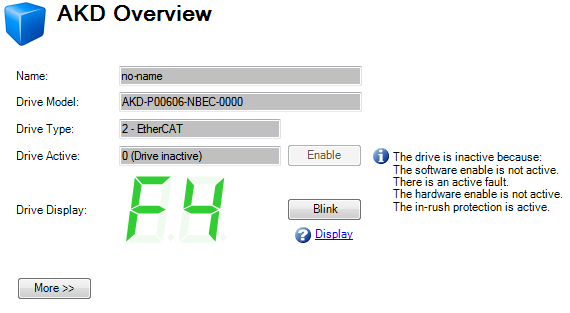
You can view or edit the following information from the Overview window.
|
Button or Dialog Box |
Description |
Parameter |
|---|---|---|
|
Name |
Names each drive in use with a unique identifier. |
|
|
DriveControl device for regulating the speed, torque and position of a motor Model |
Displays the model number of this drive. The model number is also on the label on the side of the drive. If you are offline, then you can change the type of drive that you are simulating. |
|
|
Drive Type |
Selects the operational fieldbus for your drive. |
|
|
Drive Active |
The drive is active when it is enabled and also supplies voltage to the motor. |
|
|
Click Enable to turn on the power stage in the drive and apply voltage to the motor. This command may fail for many reasons; see DRV.EN for further details. |
||
|
Click Disable to turn off the power stage and remove the voltage applied to the motor. |
||
|
Drive Display |
This graphic replicates the two-digit seven-segment display located on the front face of the drive. The seven-segment display shows a code that indicates the state of the drive and any faults that may be present. WorkBench shows a copy of what the drive display currently shows. A key to the display is here. |
|
|
Blink |
Click Blink to force the display to alternate between the whole display being on and the whole display being off for 20 seconds. You can use this button to confirm that you are communicating with the correct drive hardware. |
|
|
Setup Wizard |
The Setup wizard takes you through the essential configuration steps so that you can control the motor movement. |
|
|
More |
Click More to display Serial Number, Firmware Version, Cumulative On Time |
|
|
Serial Number |
This text box displays the unique serial number of the drive you are communicating with. The serial number is also shown on the label on the side of the drive. |
|
|
Firmware Version |
This text box displays the version of the firmware code running inside the drive. |
|
|
Cumulative On Time |
This text box displays the cumulative time this drive has been powered on. When the drive is powered on, this value continues counting from the value it had when the drive was last turned off. |
|
Stay Connected with Kollmorgen       
|
Copyright © 2015 Kollmorgen™ |

|