 MLPipeAct
|
Name |
Description |
Return type |
|
Activates a pipe |
BOOL |
|
|
Adds a Pipe Block to a pipe |
BOOL |
|
|
Creates a new pipe object |
None |
|
|
Deactivates a pipe |
BOOL |
MLPipeActActivates a pipe. A Pipe contains an Input Pipe Block (Master, PMP, or Sampler), a Converter Output Pipe Block, and any Transformation Pipe Block that can be in between. The figure below shows two Pipes, both with the same Master Input Pipe Block. The first ends with the first converter, and has a Gear Pipe Block to transform the input values from the Master. The second pipe ends with the second converter, and has a CAM Pipe Block to modify the input values from the Master.
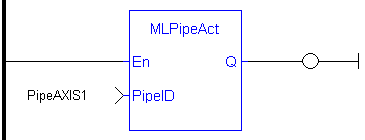
Once a Pipe is activated then history on the values in the Pipe's Blocks are saved and updated each program cycle. A Converter object connected to a destination Axis object cannot send updated position values unless its Pipe is activated.
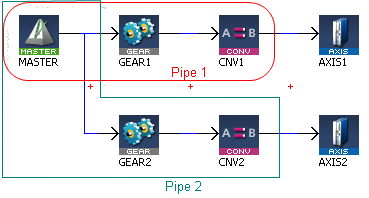
All Pipes in the Pipe Network can be activated at once with the command PipeNetwork(MLPN_ACTIVATE). This calls automatically generated code with MLPipeAct commands for each Pipe object. Therefore, in a multi-pipe program only one command can be used to activate Pipes instead of writing code for each Pipe separately.
|
PipeID |
Description |
ID number of a created Pipe object |
|
Data type |
DINT |
|
|
Range |
[-2147483648, 2147483648] |
|
|
Unit |
n/a |
|
|
Default |
— |
|
Default (.Q) |
Description |
Returns TRUE if the Pipe is activated See more details here |
|
Data type |
BOOL |
|
|
Unit |
n/a |
BOOL
|
//Activate a Pipe MLPipeAct( PipeAXIS1 );
|

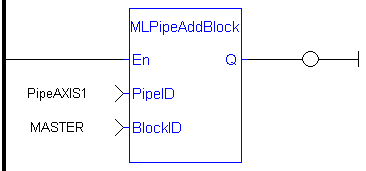
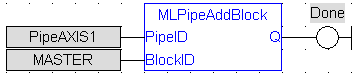
MLPipeAddBlockAdd a Pipe Block to a pipe. A Pipe contains an Input Pipe Block (Master, PMP, or Sampler), a Converter Output Pipe Block, and any Transformation Pipe Block that can be in between.
The figure below shows two Pipes, both with the same Master Input Pipe Block. If a user were to create the Pipe 1 below without using the Graphical Engine, they would use the following commands once a Pipe and the Pipe Blocks have been created.
MLPipeAddBlock( PipeAXIS1, MASTER);
MLPipeAddBlock( PipeAXIS1, MyGear);
MLPipeAddBlock( PipeAXIS1, CNV1);
All Blocks in the Pipe Network are added to a Pipe automatically. Code with MLPipeAddBlock commands are automatically generated and called in a program with PipeNetwork(MLPN_CREATE_OBJECTS). Therefore, when using the Pipe Network graphical engine to create Pipe Blocks the user does not have to manually add MLPipeAddBlock commands to the Project.
|
PipeID |
Description |
ID number of a created Pipe |
|
Data type |
DINT |
|
|
Range |
[-2147483648, 2147483648] |
|
|
Unit |
n/a |
|
|
Default |
— |
|
|
BlockID |
Description |
ID number of a created Pipe object to add to the selected Pipe |
|
Data type |
DINT |
|
|
Range |
[-2147483648, 2147483648] |
|
|
Unit |
n/a |
|
|
Default |
— |
|
Default (.Q) |
Description |
Returns TRUE if the Pipe Block is added to the Pipe See more details here |
|
Data type |
BOOL |
|
|
Unit |
n/a |
BOOL
PipeNetwork(MLPN_CREATE_OBJECTS)
|
//Add a block to a pipe MLPipeAddBlock( PipeAXIS1, MyGear );
|
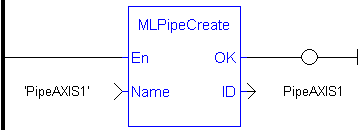
MLPipeCreateCreate a new pipe object. A Pipe contains an Input Pipe Block (Master, PMP, or Sampler), a Converter Output Pipe Block, and any Transformation Pipe Block that can be in between. The figure below shows two Pipes, both with the same Master Input Pipe Block.
Pipes are normally created in the Pipe Network using the graphical engine. Then you do not have to add MLPipeCreate function blocks to their programs. Pipes are created graphically, and the code with MLPipeCreate commands are automatically generated and called in a program with PipeNetwork(MLPN_CREATE_OBJECTS).
|
Name |
Description |
Desired name for the newly created Pipe |
|
Data type |
String |
|
|
Range |
— |
|
|
Unit |
n/a |
|
|
Default |
— |
|
ID |
Description |
Assigned ID number of the created Pipe |
|
Data type |
DINT |
|
|
Unit |
n/a |
|
|
Default |
— |
PipeNetwork(MLPN_CREATE_OBJECTS)
|
//Create a new pipe PipeAXIS1 := MLPipeCreate( 'PipeAXIS1' );
|

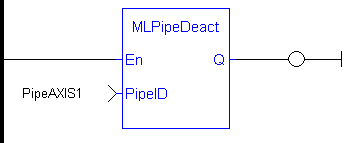
MLPipeDeactDeactivates a pipe. A Pipe contains an Input Pipe Block (Master, PMP, or Sampler), a Converter Output Pipe Block, and any Transformation Pipe Block that can be in between. The figure below shows two Pipes, both with the same Master Input Pipe Block. The first ends with the first converter, and has a Gear Pipe Block to transform the input values from the Master. The second pipe ends with the second converter, and has a CAM Pipe Block to modify the input values from the Master.
Once a Pipe is activated then history on the values in the Pipe's Blocks are lost and no longer updated. A Converter object connected to a destination Axis object cannot send updated position values once its Pipe is deactivated.
All Pipes in the Pipe Network can be deactivated at once with the command PipeNetwork(MLPN_DEACTIVATE). This calls automatically generated code with MLPipeDeact commands for each Pipe object. Therefore, in a multi-pipe program only one command can be used to deactivate Pipes instead of writing code for each Pipe separately.
|
PipeID |
Description |
ID number of a created Pipe object |
|
Data type |
DINT |
|
|
Range |
[-2147483648, 2147483648] |
|
|
Unit |
n/a |
|
|
Default |
— |
|
Default (.Q) |
Description |
Returns TRUE if the Pipe is deactivated See more details here |
|
Data type |
BOOL |
|
|
Unit |
n/a |
BOOL
|
//Deactivate a Pipe MLPipeDeact( PipeAXIS1 );
|

|
Stay Connected with Kollmorgen       
|
Copyright © 2015 Kollmorgen™ |

|
 [Top]
[Top]