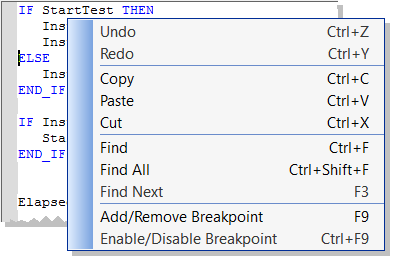
This section discusses working with breakpoints within the editor. See Breakpoints tab for information on the Breakpoints tab in the Information and Logs widget, including modifying breakpoints in bulk. For background information see About Breakpoints.
Figure 5-61: Setting Breakpoints
) or inactive (
), based on the IDE"Integrated development environment"
An integrated development environment is a type of computer software that assists computer programmers in developing software.
IDEs normally consist of a source code editor, a compiler and/or interpreter, build-automation tools, and a debugger's connectivity (see About Breakpoints).Even when you are not connected to the Controller, breakpoints can be placed in programs, sub-programs or UDFBs.
When you start your application, if the current position is not on a valid line for stepping, the breakpoint is automatically moved to the nearest valid position.
When you close the connection with the target, all the breakpoints are removed in the KAS RuntimeIn computer science, runtime (or run-time) describes the operation of a computer program, the duration of its execution, from beginning to termination (compare compile time). Within KAS, runtime also refers to the virtual machine that manage the program written in a computer language while it is running.
There are several things to note about breakpoints in SFC programs:
The recommended way to proceed for SFC sub-level programs is to rely on subprograms, where debugging is allowed.
To enable a breakpoint, right click on an inactive breakpoint and select Enable / Disable Breakpoint (or Ctrl + F9). This is only available when the IDE and runtimeIn computer science, runtime (or run-time) describes the operation of a computer program, the duration of its execution, from beginning to termination (compare compile time). Within KAS, runtime also refers to the virtual machine that manage the program written in a computer language while it is running are connected.
To disable a breakpoint, right click on an active breakpoint and select Enable / Disable Breakpoint (or Ctrl + F9). Selecting this option will remove the breakpoint from the runtime; the breakpoint will be remain in the editor and be changed to an inactive state (
).
|
Copyright © 2015 Kollmorgen™ |
|
