
The KAS RuntimeIn computer science, runtime (or run-time) describes the operation of a computer program, the duration of its execution, from beginning to termination (compare compile time). Within KAS, runtime also refers to the virtual machine that manage the program written in a computer language while it is running includes fully integrated slave functions for enabling ModbusModBus is a serial communications protocol and is now the most commonly available means of connecting industrial electronic devices. ModBus is often used to connect a supervisory computer with a remote terminal unit in supervisory control and data acquisition (SCADA) systems. Versions of the ModBus protocol exist for serial port and Ethernet (it is widely used with TCP/IP over Ethernet) communication on a serial link or EthernetEthernet is a large, diverse family of frame-based computer networking technologies that operate at many speeds for local area networks (LANs).
This communication is done in the background, asynchronously, at the cycle time (20-1000 milliseconds) specified in the Controller Properties (see "Configure the Controller"). Variables defined in the HMI"Human-machine interfaces " Also known as computer-human interfaces (CHI), and formerly known as man-machine interfaces, they are usually employed to communicate with PLCs and other computers, such as entering and monitoring temperatures or pressures for further automated control or emergency response to describe the interface (see Map Variables to HMI) are passed to the PDMM/PCMM this way. This means there is no data coherency in the data exchange because the variables read by the Modbus do not come from the same PLC"Programmable Logic Controller" A Programmable Logic Controller, PLC, or Programmable Controller is a digital computer used for automation of industrial processes, such as control of machinery on factory assembly lines. Used to synchronize the flow of inputs from (physical) sensors and events with the flow of outputs to actuators and events cycle. As this data has a rather low priority and is interpreted by human feedback, it should never be noticed by the user.
Please note that Kollmorgen HMIs are limited to communicating no more frequently than every 100 milliseconds.
The protocol supported is Open Modbus on Ethernet. The following Modbus function codes are supported:
| 1 | read coils |
| 2 | read bit inputs |
| 3 | read holding registers |
| 4 | read input registers |
| 5 | write 1 coil |
| 6 | write 1 register |
| 15 | write n coils |
| 16 | write n registers |
As a default, the first valid address for each kind of data is 1. If you use Modbus devices with other addressing conventions, you can change the base offset for each kind of data using the Tools > Addresses menu command.
A dedicated configuration tool is integrated in the KAS IDE"Integrated development environment" An integrated development environment is a type of computer software that assists computer programmers in developing software. IDEs normally consist of a source code editor, a compiler and/or interpreter, build-automation tools, and a debugger. To run it,
The Modbus Slave configuration is represented as a tree:
(*) The items with this mark can appear several times in the configuration.
You need to configure the Modbus Slave in order to make variables visible from external Modbus masters such as SCADA systems. Below is a simple example of slave configuration: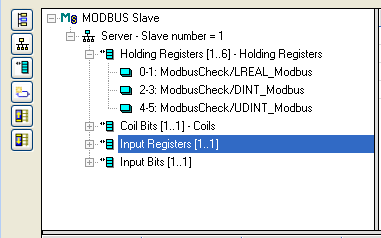
Double click on the Server item to setup the Modbus slave number that will identify the runtimeIn computer science, runtime (or run-time) describes the operation of a computer program, the duration of its execution, from beginning to termination (compare compile time). Within KAS, runtime also refers to the virtual machine that manage the program written in a computer language while it is running application. When the local server is selected, use the Insert Slave/Data Block menu command to insert Modbus data blocks. The following kinds of block are available:
Input Registers require 15-25%less CPU time to exchange data than Holding Registers do. For optimal controller performance use Input Registers where possible.
Each data block is identified by a Modbus base address and a number of items (bits or words).
Read and write requests sent by Modbus masters will be denied if the range specified in the request does not fit within a data block defined in the configuration. Requests overlapping two data blocks will be denied.
For example, if you configure a block of 16 words starting at address 1 and another block of 16 words starting at address 17, a request for read or write of 32 words starting at address 1 will be denied and an "address error" exception will be reported.
When a server data block is selected, use the ‘New symbol’ command to map a variable to an item of the data block. Each variable is identified by a valid symbol of a variable in the open project and an offset in the data block according to Modbus addressing.
You can sort the variables of each data block according to their offset using the ‘Sort symbols’ menu command at any time.
You can freely map a variable of any data type to a Modbus item. The Runtime automatically converts the value to the type of the variable.
|
Stay Connected with Kollmorgen       
|
Copyright © 2015 Kollmorgen™ |

|