ESI Files
This tab lists the available ESI (EtherCATEtherCAT is an open, high-performance Ethernet-based fieldbus system. The development goal of EtherCAT was to apply Ethernet to automation applications which require short data update times (also called cycle times) with low communication jitter (for synchronization purposes) and low hardware costs Slave Information) files and provides the ability to add and remove files.
ESI files are sorted by vendor and then the files provided by the vendor. Each file lists the device it supports including
- Device name
- Device description
- Device revision number
ESI files are easily added to the list by clicking the Add button and navigating to where the file is saved. The Delete button will remove a file from the list but not your hard drive.
-
-
KAS IDE"Integrated development environment" An integrated development environment is a type of computer software that assists computer programmers in developing software. IDEs normally consist of a source code editor, a compiler and/or interpreter, build-automation tools, and a debugger manages Kollmorgen devices (AKD, AKD-C, AKD-N, etc.) and will automatically install and/or upgrade their ESI files to the latest version. The KAS IDE allows Kollmorgen ESI files to be upgraded, but downgrading is not possible. For example, the Kollmorgen ESI files: “AKD-for-KAS.xml" or "AKD-N-for-KAS.xml" should not be manually imported.
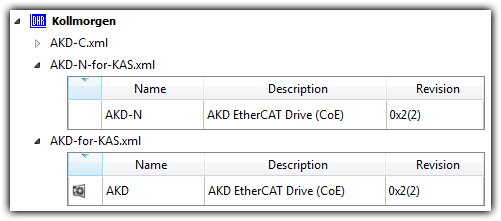
Figure 5-110: Do not overwrite these files.
Under special circumstances, Kollmorgen ESI files may be manually upgraded. We recommend working with a Kollmorgen representative when doing so.
-
-
WARNING: Replacing an ESI file changes the configuration of any associated device to the new file. You will be prompted to confirm or cancel replacing an ESI file and the associated devices' configurations.
ESI files will be replaced when:
- Opening a project file that contains an ESI file that is different from the file in the KAS Internal Library of ESI Files stored on the PC.
- You are prompted to select "term_A" (use the version in the project) or "term_B" (use the ESI Internal Library version). Selecting "term_A" will overwrite the ESI Internal Library version.
- Pressing the Add button in the ESI Files tab view and:
- importing an ESI file name that already exists in the KAS Internal Library of ESI Files stored on the PC.
- importing an ESI file that contains duplicate device information that already exists in the KAS Internal Library of ESI Files stored on the PC.
|
Stay Connected with Kollmorgen       
|
Copyright © 2018 Kollmorgen |

|