Buffer Modes
Some of the FBs have an input called BufferMode. With this input, the FB can either work in a Non-buffered mode (default behavior) or in a Buffered mode. The difference between those modes is when they start their action:
- A command in a non-buffered mode acts immediately, even if this interrupts another motion
- A command in a buffered mode waits untill the current FB sets its Done output (or InPosition, or InVelocity,..).
There are six buffer modes that can be specified at the BufferMode input of the function blocks.
-
-
The MC_BUFFER_MODE_BLENDING_NEXT and MC_BUFFER_MODE_BLENDING_HIGH buffer modes may increase the acceleration to meet the target position at the specified velocity. The acceleration will be automatically re-calculated to reach the target position at the specified velocity if the specified acceleration is too small to reach the target velocity within the specified distance.
For example, suppose the following absolute position moves are commanded:
Move #1:
Position = 90, Velocity = 180, Accel = 360
Move #2 (with Blending High or Blending Next)
Position = 360, Velocity = 360, Accel = 360
To reach velocity = 360 within a distance of 90, the acceleration must be 720. The function block will automatically calculate and apply an acceleration of 720 to reach the target position at the specified velocity: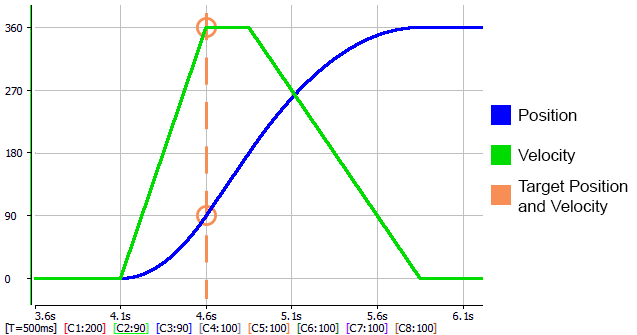
 See Also
|
Stay Connected with Kollmorgen       
|
Copyright © 2018 Kollmorgen |

|