Initialize and Start up a Pipe Network
 See Motion State Machine
The Motion State Machine is driven by the IEC"International Electrotechnical Commission"
IEC is a not-for-profit, non-governmental international standards organization that prepares and publishes International Standards for all electrical, electronic and related technologies 61131-3 application with the help of dedicated function blocks.
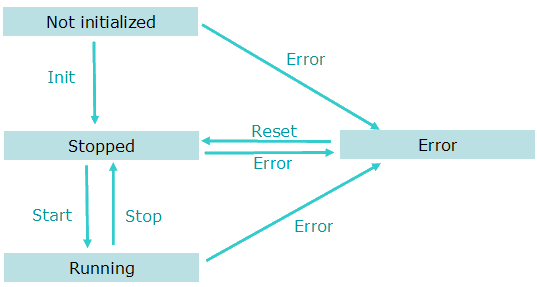
Figure 4-17: Motion State Machine
Each arrow represents a transition from one State to another one.
To start-up a Pipe Network in your IEC 61131-3 application program, you have to perform the following steps with their respective functions:
| Step | ML function blocks | Description |
|---|---|---|
| Motion Init | MLMotionInit | Initialization of the Motion is done with this dedicated function Set the Motion engine update rate. Wait for acknowledgement: MLMotionStatus() = MLSTATUS_INITIALISED to continue program operation |
| Create Cam Profiles | Profiles(MLPR_CREATE_PROFILES); | Create Cam Profiles from cam files |
| Create Pipe Network | PipeNetwork(MLPN_CREATE_OBJECTS); | |
| Motion Start | MLMotionStart | Starts the motion engine, motion bus driver, and initializes EtherCAT***EtherCAT is an open, high-performance Ethernet-based fieldbus system. The development goal of EtherCAT was to apply Ethernet to automation applications which require short data update times (also called cycle times) with low communication jitter (for synchronization purposes) and low hardware costs network to operational mode, then waits for acknowledgement: MLMotionStatus() = MLSTATUS_RUNNING to continue program operation |
| Power on all axes | PipeNetwork(MLPN_POWER_ON); | |
| Activate the pipes | PipeNetwork(MLPN_ACTIVATE); | |
| Connect the axes to the pipes | PipeNetwork(MLPN_CONNECT); | For example: in the following Pipe Network this function connects the Converter blocks (CNV1, CNV2 and CNV3) to the Axis blocks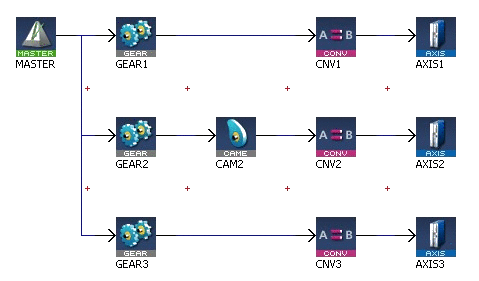 |
For more details on all ML function blocks related to motion, Motion Library


