

 Function - Creates a new CAM Profile Object for use in a PLC Program or Pipe Network CAM block.
Inputs
|
Input |
Data Type |
Range |
Unit |
Default |
Description |
|---|---|---|---|---|---|
|
Name |
STRING |
No range |
N/A |
No default |
Name of initialized CAM Profile |
Outputs
|
Output |
Data Type |
Range |
Unit |
Description |
|---|---|---|---|---|
|
OK |
BOOL |
FALSE, TRUE |
N/A |
|
|
ID |
DINT |
No range |
N/A |
Returns the ID number of the created CAM Profile.
|
Remarks
This function is automatically called if a Profile is created in the Project Explorer with user-defined settings entered in the CAM Profile Properties screen.
- Profiles are created and initiated separately.
- The shape is modified with the CAM Editor.
- With the Editor, profiles can be changed graphically or by manually changing values in a numeric table relating input and output values with specific slopes.
- The Cam Editor software tool provides the capability to visualize, analyze, edit, and smooth profiles.
- Profile switching can be done on the fly without losing synchronization and without dead time.
- Offsets and ratios of CAM Profiles can be changed on the fly.
-
-
Profile objects are normally created in the Project Explorer.
You do not have to add MLCamInit function blocks to their programs.
Right click the Profiles folder under PLC->Motion and click Add to create a new profile.
Parameters are entered directly in a window and the code is automatically added to the current project.
-
-
This function should be called after MLMotionInit is called and before MLMotionStart is called.
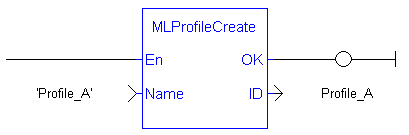
FBD Language Example

FFLD Language Example
IL Language Example
Not available.
ST Language Example
//Create a new Profile
Profile_A := MLProfileCreate( 'Profile_A' );
See Also


