MLCamSwitch

 Function - Switches the CAM Profile in a selected CAM object.
Inputs
|
Input |
Data Type |
Range |
Unit |
Default |
Description |
|---|---|---|---|---|---|
|
BlockID |
DINT |
1 to 1024 |
N/A |
No default |
ID number of an initialized CAM Pipe Block. |
|
ProfileID |
DINT |
-2147483648 to 2147483647 |
N/A |
No default |
|
Outputs
|
Output |
Data Type |
Range |
Unit |
Description |
|---|---|---|---|---|
|
Default (.Q) |
BOOL |
|
|
|
Remarks
- Can be used in combination with a comparator to verify profiles are switched at a time where the input and output values of both the old and new profiles are equal.
- This is so an Axis receives continuous position values and does not jump.
- These profiles are created and initiated separately and the shape is created with the CAM Editor.
- With the Editor, profiles can be changed graphically or by manually changing values in a numeric table relating input and output values with specific slopes.
- The CAM Editor is used to visualize, analyze, edit, and smooth profiles.
- See CAM Profile Switching for more information.
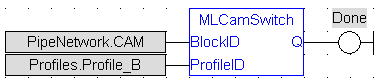
FBD Language Example
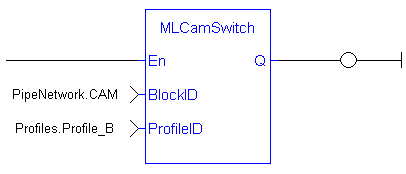
FFLD Language Example
IL Language Example
Not available.
ST Language Example
//Switch CAM Profile
MLCamSwitch(PipeNetwork.CAM, Profiles.Profile_B);
See Also


