MLCompInit

 Function - Initializes a comparator Pipe Block with user-defined settings for use in a PLC Program.
Inputs
Outputs
|
Output |
Data Type |
Range |
Unit |
Description |
|---|---|---|---|---|
|
Default (.Q) |
BOOL |
FALSE, TRUE |
N/A |
|
Remarks
- Function block is automatically called if a Comparator Block is added to the Pipe Network.
- User-defined settings are entered in the Pipe Blocks Properties screen.
- The Transition Flag of a comparator object turns TRUE if the input position to the comparator is greater or equal to the reference.
- The Comparator Transition Flag stays TRUE until it is reset.
- If the input ThroughZero is set to TRUE, the system must cross zero and then the reference position before the Transition Flag is set.
- If ThroughZero is FALSE, the Transition Flag is set immediately if the input pipe position is greater or equal to the Reference value.
-
-
Comparator objects are normally created in the Pipe Network using the graphical engine.
You do not have to add MLCompInit function blocks to their programs.
Parameters are entered directly in windows, and the code is then automatically added to the current project.
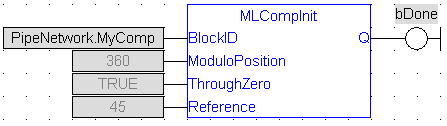
FBD Language Example
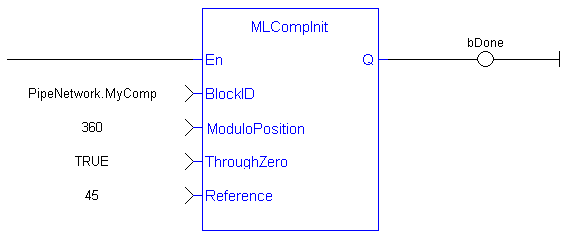
FFLD Language Example
IL Language Example
Not available.
ST Language Example
      //Initiate a created Comparator Block named “MyComp” to:
//   Modulo of 360
//   Require the input position to first cross 0 before the
//      MLCompCheck output is triggered
//   Input compared position to 45

MyComp := MLBlkCreate( 'MyComp', 'COMPARATOR' );
MLCompInit( MyComp, 360.0, TRUE, 45.0 );
See Also


