MLPipeAddBlock

 Function - Adds a Pipe Block to a pipe.
Inputs
|
Input |
Data Type |
Range |
Unit |
Default |
Description |
|---|---|---|---|---|---|
|
PipeID |
DINT |
1 to 1024 |
N/A |
No default |
ID number of a created Pipe object. |
|
BlockID |
DINT |
1 to 1024 |
N/A |
No default |
ID number of a created Pipe object to add to the selected Pipe. |
Outputs
|
Output |
Data Type |
Range |
Unit |
Description |
|---|---|---|---|---|
|
Default (.Q) |
BOOL |
FALSE, TRUE |
N/A |
|
Remarks
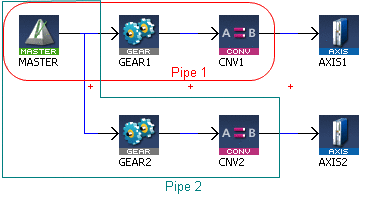
A Pipe contains an Input Pipe Block (Master, PMP, or Sampler), a Converter Output Pipe Block, and any Transformation Pipe Block that can be in between.
- The MLPipeAddBlock image shows two Pipes, both with the same Master Input Pipe Block.
- If Pipe 1 is created without using the Graphical Engine, these commands are used once a Pipe and the Pipe Blocks have been created:
- MLPipeAddBlock( PipeAXIS1, MASTER);
- MLPipeAddBlock( PipeAXIS1, MyGear);
- MLPipeAddBlock( PipeAXIS1, CNV1);
-
-
All Blocks in the Pipe Network are added to a Pipe automatically.
Code with MLPipeAddBlock commands are automatically generated and called in a program with PipeNetwork(MLPN_CREATE_OBJECTS).
When using the Pipe Network graphical engine to create Pipe Blocks, the user does not have to manually add MLPipeAddBlock commands to the Project.
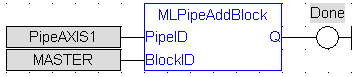
FBD Language Example
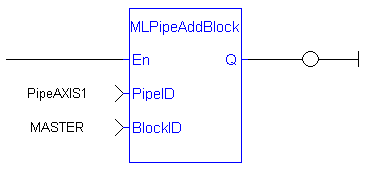
FFLD Language Example
IL Language Example
Not available.
ST Language Example
//Add a block to a pipe
MLPipeAddBlock( PipeAXIS1, MyGear );
See Also
- MLCNVConnect
- MLPipeAct
- MLPipeCreate
- MLPipeDeact
- Pipe Network Functions for the PLC - MLPN_CREATE_OBJECTS


