MLTrigInit

 Function - Initializes a Trigger object for use in a PLC program.
Inputs
|
Input |
Data Type |
Range |
Unit |
Default |
Description |
|---|---|---|---|---|---|
|
BlockID |
DINT |
1 to 1024 |
N/A |
No default |
ID number of an initiated Trigger object. |
|
Input_Axis |
STRING |
No range |
N/A |
No default |
Name of the axis where the Fast Input is located. |
|
InputID |
DINT |
0 to 1 |
N/A |
No default |
ID number of the Fast Input. InputID INT Range = 0 to 1
|
|
TriggerMode / Edge |
DINT |
See Description. |
N/A |
No default |
The edge to trigger on.
|
Outputs
|
Output |
Data Type |
Range |
Unit |
Description |
|---|---|---|---|---|
|
Default (.Q) |
BOOL |
FALSE, TRUE |
N/A |
|
Remarks
- This function block is automatically called if a Trigger Block is added to the Pipe Network, with user-defined settings entered in the Pipe Blocks Properties screen.
- The Trigger object monitors a selected Fast Input and captures the time of a rising or falling edge event.
- With the time and pipe position information, the Trigger object extrapolates the axis position when the Fast Input event occurred.
- Parameters to enter include:
- The name of the Pipe Block.
- The Axis where the Fast Input is located.
- The number of the desired Fast Input.
- Whether to trigger on the rising or falling edge of the input.
-
-
Trigger objects are normally created in the Pipe Network using the graphical engine.
You do not have to add MLTrigInit function blocks to their programs.
Parameters are entered directly in pop-up windows and the code is automatically added to the current project.
Fast Homing - Inputs
See these topics for more information:
- Example: Fast Homing with the Pipe Network Motion Engine Axis Pipe Block
- Example: Fast Homing with the PLCopen Motion Engine
- Fast Inputs with Pipe Network Motion
- Pipe Network Registration and Fast Homing
- Example: Registration Position Capture with Pipe Network Trigger Block
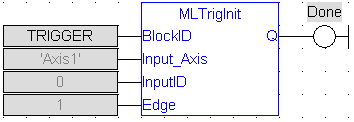
FBD Language Example
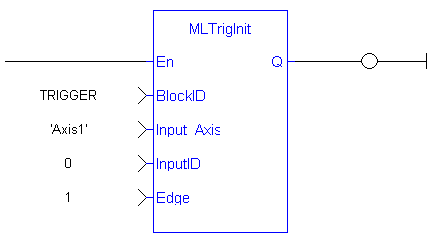
FFLD Language Example
IL Language Example
Not available.
ST Language Example
//Create and Initiate a Trigger Pipe Block named “Trigger” and set it up to receive the trigger signal from Axis1, capture engine 0, and the rising edge of the signal
TRIGGER := MLBlkCreate( 'TRIGGER', 'TRIGGER' );
MLTrigInit( TRIGGER, 'Axis1', 0, 1 );
See Also


