PLC Variable Selector dialog box
The PLC Variable Selector dialog box is used to filter the variables to show only those variables compatible with the size of the selected PDO object.
- Mapping to variables within a structure instance is supported.
- Mapping to either array variables or array variables within structure instance is not supported.
Create PLC Variable Button
This button is used to create a new variable to map to the selected items. (Figure 1)
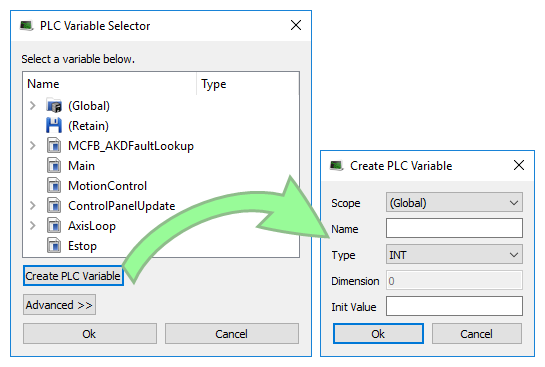
Figure 1: PLC Variable Selector dialog box > Create PLC Variable dialog box
|
Field |
Description |
|
Scope |
Defines where the variable is created. |
|
Name |
See Name a Variable. |
|
Type |
Defines the variable type and its Dimension if the variable is an array. See: |
|
Dimension |
The dimension of the variable (read-only). The dimension is set automatically based on the necessary size and the selected variable type. |
|
Init Value |
Based on the variable Type we select, the KAS-IDE automatically sets the Dimension (the size of the array) and assign the bits across the objects.
In this video we will learn how to map a variable to several PDO objects.
-
-
- Safety PDOs are highlighted in yellow with a border.
- Any variable assigned to a FSoE PDO must be Read Only.
- See Set Up a Variable to Monitor Safety Data.
See also Create Variables
Advanced Button
For integer variables with types stored on several bits, the Advanced button gives access to the Start bit definition. (Figure 2)
This allows you to link a set of channels to a specific range of bits within an integer variable.
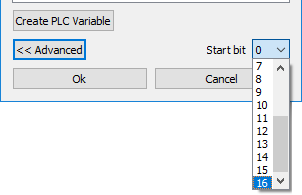
Figure 2: Advanced button > Start bit
Example
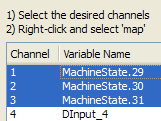
Select three channels ranging from 1 to 3 and map them to a DINT variable (stored on 32-bits ranging from 0 to 31).
- The first channel can be linked to position ranging from 0 to 29.
- The three channels are mapped to the last three bits ranging from 29 to 31. (Figure 3)
-
- When the selected variable is an array, the Start bit is disabled.
An offset is not allowed when mapping to an array.


