EtherCAT Devices Backup
The Backup operation discovers all devices on the EtherCAT network and stores the topology information, drive firmware files, and parameters.
|
Controller |
Local Storage |
|---|---|
|
AKD PDMM or PCMM |
SD Memory Card See SD Card Support for more information. |
|
PCMM2G |
Controller flash memory |
Required Items
These items are required before starting a backup of the EtherCAT devices:
-
The Kollmorgen AKD Series Servo Drives firmware files package (you are prompted with the expected file).
- The package is:
- Included in the KAS software installation directory
- Example:
\Program Files (x86)\Kollmorgen\Kollmorgen Automation Suite {{kas.version}}\Astrolabe\DrivesFW. - Example:
C:\Users\{user.name}\Local\Kollmorgen\Kollmorgen Automation Suite {{kas.version}}\Astrolabe\DrivesFw.
- Example:
- Available for download from Kollmorgen's AKD® Series Servo Drives website.
- Included in the KAS software installation directory
- The package is:
- AKD PDMM or PCMM require an SD memory card in the SD slot.
- PCMM2G requires a USB flash drive connected to the USB port.
Device Connection and Configuration
All EtherCAT network devices must be:
- Connected to the controller.
- Configured as necessary for machine operation.
- Verify the devices are in the order as expected.
The topology information is stored in the backup and is used to check for identical topology during a restore function.
The device order is not important.Example: An AKD can be anywhere in the EtherCAT topology but, for restore to occur, the devices must be in the same order as when backed up.
-
A PLC application downloaded to the controller, containing the EtherCAT device map.
- The PLC application cannot be running and the IDE must not be in Online Configuration Mode.
Stop the PLC application or disable Online Configuration Mode before a Backup or Restore.
Modular EtherCAT
This procedure should be followed to backup EtherCAT devices when the modular EtherCAT feature is used to remove devices to create a machine variant.
- Run the KAS application which sets up the correct EtherCAT topology for the machine variant.
- Stop the KAS application.
- Do not power cycle or reboot the controller between Steps 2 and 3.
- Backup the EtherCAT devices.
See Backup Procedure.
Backup Procedure
- On the Web server home page, click the Backup & Restore tab.
- On the Backup tab, click the Backup EtherCAT Devices button.
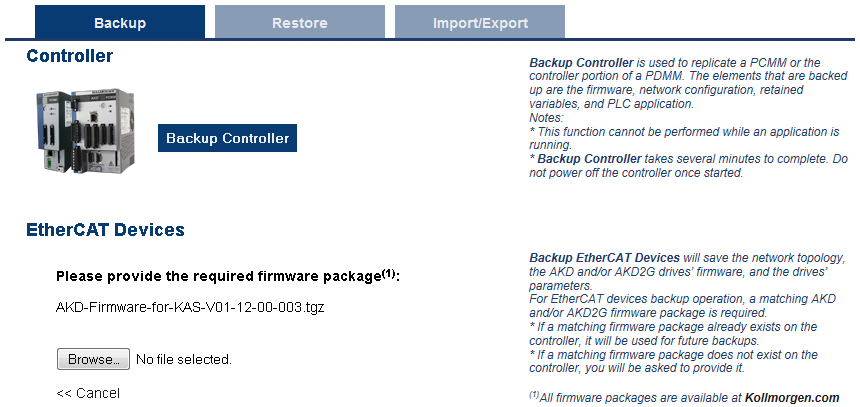
- Selecting the firmware package files is a one-time event.
- The controller remembers the selection for future backups. (Figure 1)
-
- AKD series drives have a firmware package file specific to their firmware version.
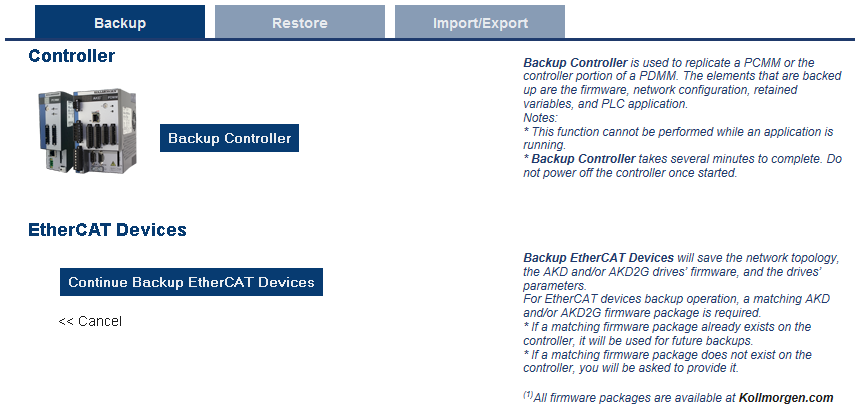
AKD2G has a different firmware package file specific to its firmware version. - Click the Continue Backup EtherCAT Devices button. (Figure 2)
It will take a couple of minutes or longer, depending on the number of Kollmorgen AKD Series Servo Drives present in the system.
The web server will ask you to choose one or more firmware package files and suggest the filename that matches the firmware version on your drives.
When the backup is complete, the web server will indicate whether the backup was successful.
-
- After the backup is complete, it is a good idea to export the backup to an off-site location for safe keeping.
See Controller Import / Export Backup from Web server for more information.
 Related Topics


