Certificates tab
-
-
This tab is only visible for PCMM2G controllers.
Usage
This tab is used to:
- View the current SSL Server Certificate’s details.
- Create SSL Server Certificates for HTTPS connections.
- Upload SSL Client Certificates for HTTPS connections.
- Manage the SSL Client Certificates on the PCMM2G.
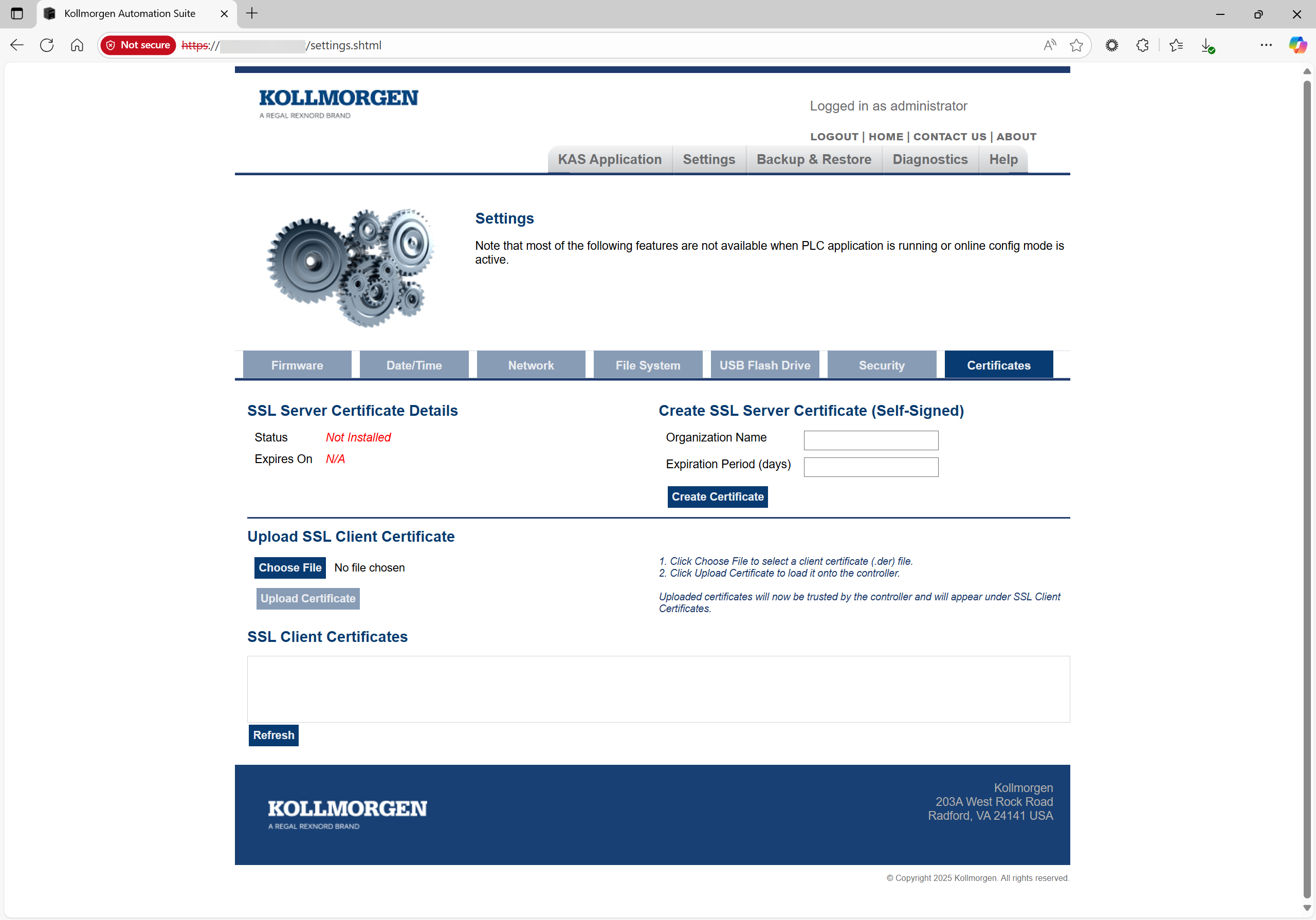
Figure 1: Certificates tab
SSL Server Certificate Details
This area is used to view the status of the certificate and its expiration date.
The certificate statuses are:
- Installed
- Not Installed
- Invalid - IP Address Mismatch
- Invalid - Expired
Create SSL Server Certificate (Self-Signed)
This area is used to create a Secure Sockets Layer (SSL) certificate on the PCMM2G.
- SSL certificates:
- Are used to enable HTTPS connections on the PCMM2G.
- Enable encrypted communication between a client (e.g., web browser, OPC UA client) and a PCMM2G controller to ensure sensitive data (e.g. passwords) cannot be intercepted or read by third parties.
- When creating an SSL certificate, the PCMM2G’s current IP address is linked to the certificate with an expiration date.
- The certificate is valid only when the IP address listed on the certificate is identical to the PCMM2G’s IP address.
- It is recommended to set a static IP address for the PCMM2G when using an SSL certificate.
- To ensure secure and trusted communications with the Web server through HTTPS, the SSL certificate must be installed on the user’s machine after creating it.
Upload SSL Client Certificate
This area is used to select and upload SSL client certificates to enable secure and trusted communication between a PCMM2G and other devices.
- All valid SSL certificates uploaded through this interface are automatically added to the trusted certificate store of the PCMM2G.
- Once uploaded, these certificates are used by the OPC UA Server running on PCMM2G to authenticate incoming client connections.
- If a client attempts to connect using a certificate that is not in the trusted store, the PCMM2G OPC UA Server rejects the connection.
OPC UA Server Integration
The OPC UA Server on a PCMM2G leverages the uploaded SSL certificates using:
- Authentication: Verifies the identity of OPC UA clients using their X.509 certificates.
- Encryption: Ensures secure data exchange using the public key from the client certificate.
- Trust Management: Only clients with certificates in the trusted store can establish secure sessions when using Sign or SignAndEncrypt security modes.
This aligns with the OPC UA specification’s security model, ensuring that communication is both authenticated and encrypted, and that only trusted clients can interact with the controller.
SSL Client Certificates
This area lists all SSL Client Certificates that have been uploaded to the trusted certificate repository on the PCMM2G controller.
Users can also download or remove certificates from the trusted store directly through this interface.


