
 Function Block - Fast homing to a home switch.
- Performs a homing function by searching for an absolute positioned external physical switch.
- The switch must be connected to one of the two fast inputs on the Axis' AKD drive.
- An Absolute Switch has two Off (or On) areas.
Usage
- The homing is commanded in the most likely direction where the sensor can be found.
- If any LimitSwitch is found during Homing (any of them), a special process is started in the opposite direction.
- The AbsSwitch is searched to switch Off (or On, depending on SwitchMode setting).
- The Edge (passed by) and homing process is restarted in the original direction and with the same conditions.
- This ensures the end conditions are always the same.
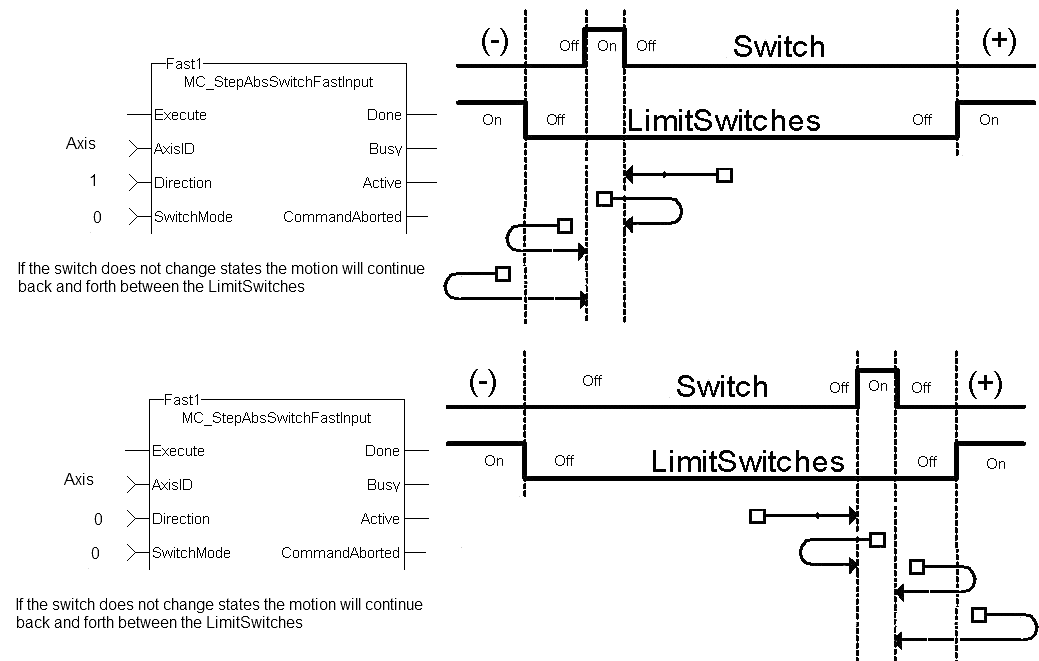
Figure 1: MCFB_StepAbsSwitchFastInput Usage 1
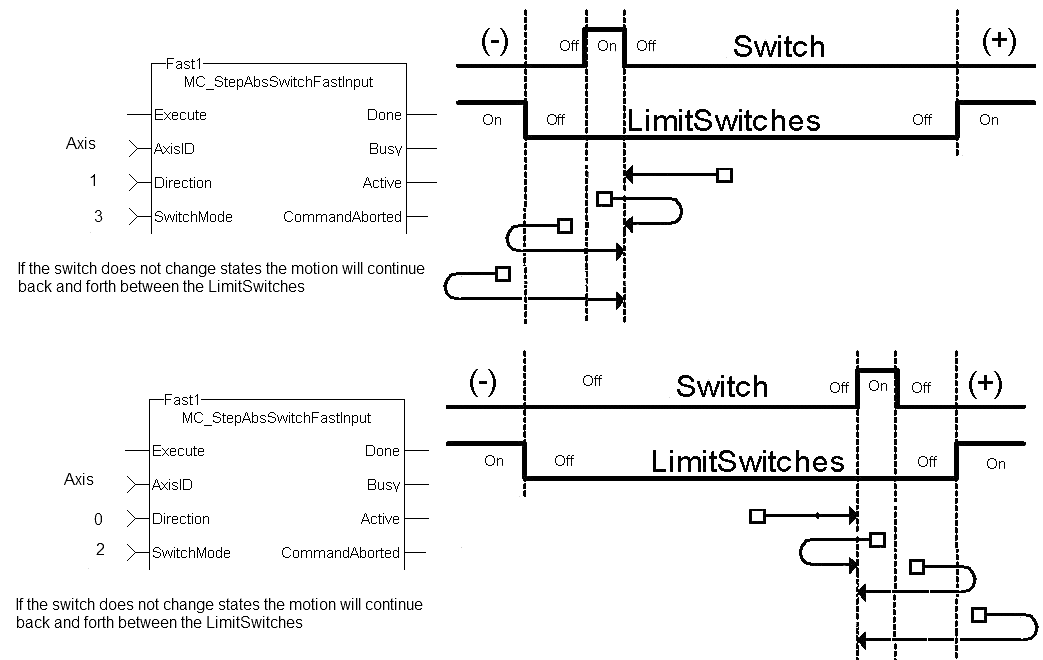
Figure 2: MCFB_StepAbsSwitchFastInput Usage 2
Inputs
|
Input |
Data Type See Data Types. |
Range |
Unit |
Default |
Description |
|---|---|---|---|---|---|
|
Execute |
BOOL |
FALSE, TRUE |
N/A |
No default |
|
|
AxisID |
AXIS_REF |
1 to 256 |
N/A |
No default |
|
|
Direction |
BOOL |
FALSE, TRUE |
N/A |
No default |
Defines the axis homing direction.
|
|
SwitchMode |
DINT |
0 to 3 |
N/A |
No default |
Switch state to complete homing.
|
|
Velocity |
LREAL |
No range |
User units / sec |
No default |
Commanded velocity for the homing move. |
|
Acceleration |
LREAL |
No range |
User units / sec2 |
No default |
Commanded acceleration for the homing move. |
|
Deceleration |
LREAL |
No range |
User units / sec2 |
No default |
Commanded deceleration for the homing move. |
|
Jerk |
LREAL |
No range |
User units / sec3 |
No default |
|
|
TorqueLimit |
LREAL |
No range |
User units |
No default |
Maximum torque applied for the homing move.
|
|
TimeLimit |
TIME |
No range |
Sec |
No default |
Maximum time for homing move to complete.
|
|
DistanceLimit |
LREAL |
No range |
User units |
No default |
Maximum distance for homing move to complete.
|
|
FastInputNum |
BOOL |
FALSE, TRUE |
N/A |
No default |
|
|
PosLimitSwitch |
BOOL |
FALSE, TRUE |
N/A |
No default |
The positive direction limit switch input I/O point. |
|
NegLimitSwitch |
BOOL |
FALSE, TRUE |
N/A |
No default |
The negative direction limit switch input I/O point. |
|
BufferMode |
SINT |
Enumerated |
N/A |
No default |
The specified buffer mode.
|
Outputs
|
Output |
Data Type See Data Types. |
Range |
Unit |
Description |
||||||||||||||
|---|---|---|---|---|---|---|---|---|---|---|---|---|---|---|---|---|---|---|
|
Done |
BOOL |
FALSE, TRUE |
N/A |
Indicates the move completed successfully. |
||||||||||||||
|
Busy |
BOOL |
FALSE, TRUE |
N/A |
High from the moment the Execute input goes high until the time the move is ended. |
||||||||||||||
|
Active |
BOOL |
FALSE, TRUE |
N/A |
Set when the function block is active. |
||||||||||||||
|
CommandAborted |
BOOL |
FALSE, TRUE |
N/A |
If TRUE, the command was aborted by another function block. |
||||||||||||||
|
Error |
BOOL |
FALSE, TRUE |
N/A |
Signals an error has occurred within the function block. |
||||||||||||||
|
ErrorID |
INT |
Enumerated |
N/A |
Indicates the error if Error output is TRUE. Error identifier:
|
||||||||||||||
|
TriggerPosition |
LREAL |
No range |
User units |
|
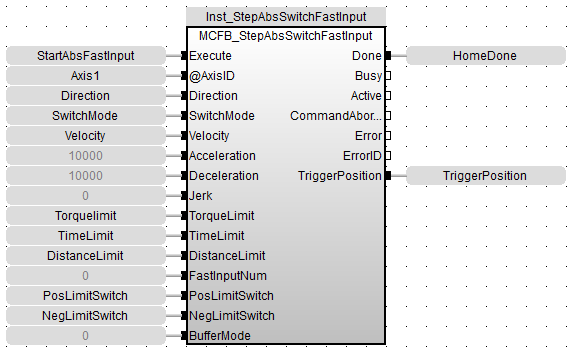
FBD Language Example
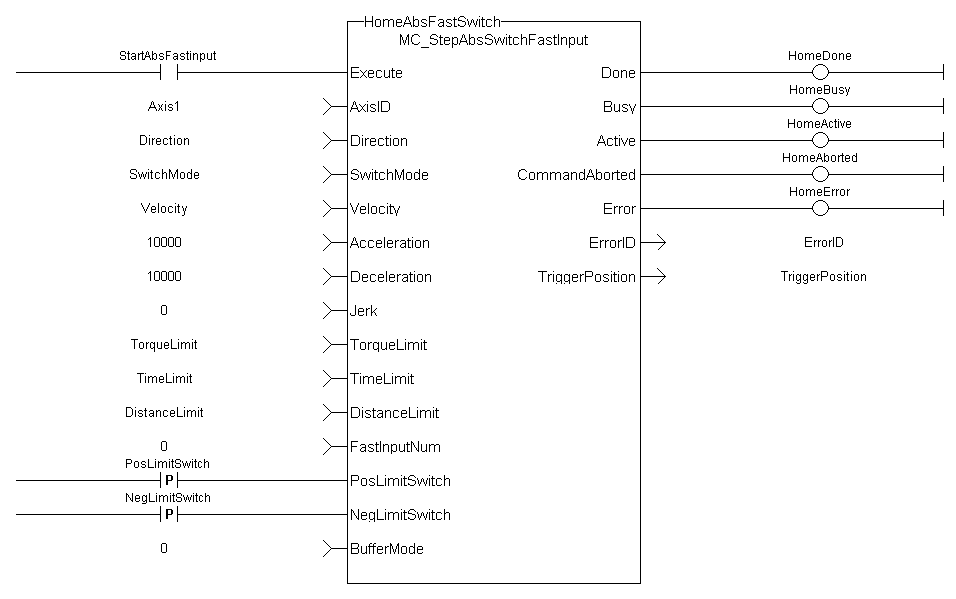
FFLD Language Example
PosLimitSwitch, NegLimitSwitch are declared I/O points.
IL Language Example
Not available.
ST Language Example
Execute_1 :=1;
(*Positive_Switch and Negitive_Switch are physical hardware in Dictionary. *)

Inst_MC_StepAbsSwitchFastInput( Execute_1, Axis1, 0, 0, 10000.0,Acceleration:=10000.0, 10000.0, 0, 0, 0, 0, 0, Positive_Switch , Negitive_Switch ,  0)

HomeComplete := Inst_MC_StepAbsSwitchFastInput.Done;
HomeBusy := Inst_MC_StepAbsSwitchFastInput.Busy;
HomeActive := Inst_MC_StepAbsSwitchFastInput.Active;
HomeAborted := Inst_MC_StepAbsSwitchFastInput.CommandAborted;
HomeError := Inst_MC_StepAbsSwitchFastInput.Error;
HomeErrorID := Inst_MC_StepAbsSwitchFastInput.ErrorID;
HomeTriggerPosition := Inst_MC_StepAbsSwitchFastInput.TriggerPosition;
See Also


