
 Function Block - Fast homing to a limit switch.
- Performs a homing function by searching for an external physical switch.
- The switch must be connected to one of the two fast inputs on the Axis' AKD drive.
- The Axis moves and, when a fast input is triggered, the triggered axis then performs an absolute move to the latched position.
Usage
The homing is commanded in the most likely direction where the sensor can be found.
In this example (-).
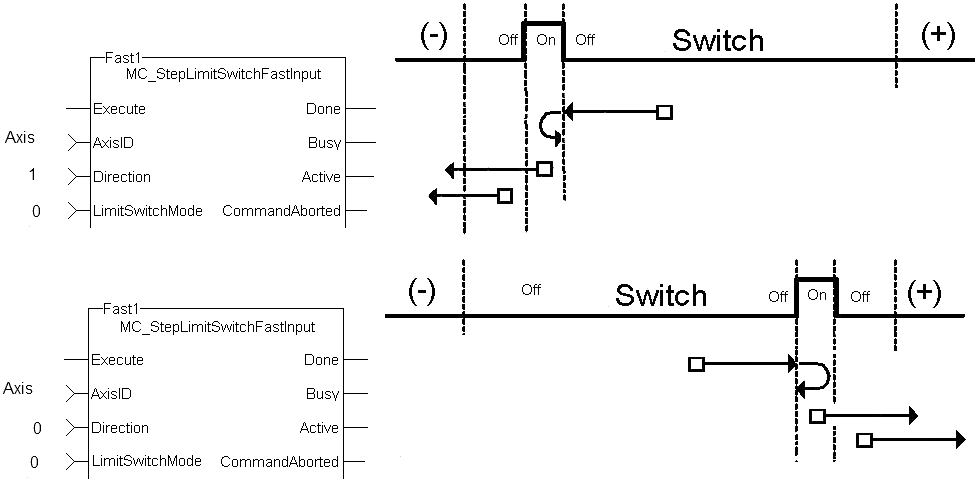
Figure 1: MCFB_StepLimitSwitchFastInput Usage
Inputs
|
Input |
Data Type See Data Types. |
Range |
Unit |
Default |
Description |
|---|---|---|---|---|---|
|
Execute |
BOOL |
FALSE, TRUE |
N/A |
No default |
|
|
AxisID |
AXIS_REF |
1 to 256 |
N/A |
No default |
|
|
Direction |
BOOL |
FALSE, TRUE |
N/A |
No default |
Defines the axis homing direction.
|
|
LimitSwitchMode |
DINT |
0 to 1 |
N/A |
No default |
Limit switch state to complete homing.
|
|
Velocity |
LREAL |
No range |
User units / sec |
No default |
Commanded velocity for the homing move. |
|
Acceleration |
LREAL |
No range |
User units / sec2 |
No default |
Commanded acceleration for the homing move. |
|
Deceleration |
LREAL |
No range |
User units / sec2 |
No default |
Commanded deceleration for the homing move. |
|
Jerk |
LREAL |
No range |
User units / sec3 |
No default |
|
|
TorqueLimit |
LREAL |
No range |
User units |
No default |
Maximum torque applied for the homing move.
|
|
TimeLimit |
TIME |
No range |
Sec |
No default |
Maximum time for homing move to complete.
|
|
DistanceLimit |
LREAL |
No range |
User units |
No default |
Maximum distance for homing move to complete.
|
|
FastInputNum |
BOOL |
FALSE, TRUE |
N/A |
No default |
|
|
BufferMode |
SINT |
Enumerated |
N/A |
No default |
The specified buffer mode.
|
Outputs
|
Output |
Data Type See Data Types. |
Range |
Unit |
Description |
||||||||||||||
|---|---|---|---|---|---|---|---|---|---|---|---|---|---|---|---|---|---|---|
|
Done |
BOOL |
FALSE, TRUE |
N/A |
Indicates the move completed successfully. |
||||||||||||||
|
Busy |
BOOL |
FALSE, TRUE |
N/A |
High from the moment the Execute input goes high until the time the move is ended. |
||||||||||||||
|
Active |
BOOL |
FALSE, TRUE |
N/A |
Set when the function block is active. |
||||||||||||||
|
CommandAborted |
BOOL |
FALSE, TRUE |
N/A |
If TRUE, the command was aborted by another function block. |
||||||||||||||
|
Error |
BOOL |
FALSE, TRUE |
N/A |
Signals an error has occurred within the function block. |
||||||||||||||
|
ErrorID |
INT |
Enumerated |
N/A |
Indicates the error if Error output is TRUE. Error identifier:
|
FBD Language Example
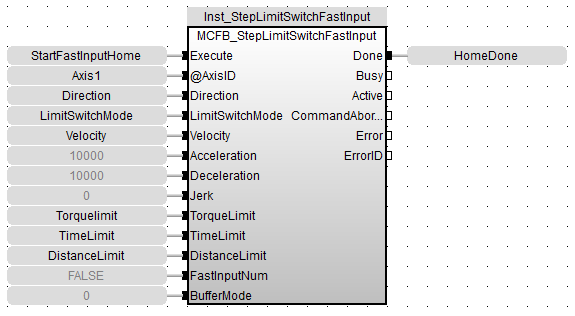
FFLD Language Example
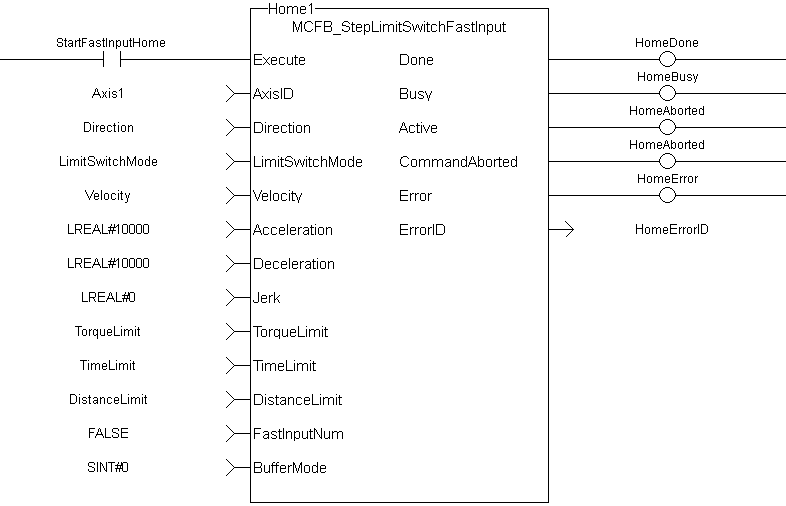
IL Language Example
Not available.
ST Language Example
Execute_1 :=1;

Inst_MCFB_StepLimitSwitchFastInput( Execute_1, Axis1, 0, 0, 10000.0, 10000.0, 10000.0, 0, 0, 0, 0, 0, 0);

HomeComplete := Inst_MCFB_StepLimitSwitchFastInput.Done;
HomeBusy := Inst_MCFB_StepLimitSwitchFastInput.Busy;
HomeActive := Inst_MCFB_StepLimitSwitchFastInput.Active;
HomeAborted := Inst_MCFB_StepLimitSwitchFastInput.CommandAborted;
HomeError := Inst_MCFB_StepLimitSwitchFastInput.Error;
HomeErrorID := Inst_MCFB_StepLimitSwitchFastInput.ErrorID;
See Also


