Copy Retained Variables Values to Init Value from another Controller
The Copy Variable Values to Init Values from Another Controller is used to:
- Transfer retained variable values from a source controller.
- Store them as initial values within the current KAS project.
- These values can then be applied to a replacement controller during project download and application startup.
- This feature can be used for any controller replacement scenario where retained variable definitions are compatible between the source controller and the target project.
Typical use cases include:
- Replacing a failed controller with a new controller.
- Migrating an application to replacement hardware.
- Preserving machine-specific settings, calibration data, production counters, and configuration parameters during controller replacement.
-
-
- This feature is particularly valuable when migrating from legacy AKD PDMM or PCMM controllers to a PCMM2G controller because it provides a simple method to preserve retained data during platform migration.
- For PCMM2G-to-PCMM2G replacement scenarios, this feature remains fully supported.
- Alternative methods (e.g., project backup and restore) are also be available.
The migration process has these basic steps:
Prerequisites
Before transferring retained variable values, verify:
- The source controller is online and reachable over network.
- The KAS project on the source controller matches the project currently opened in the KAS-IDE.
- The retained variable definitions in the source controller and project are identical.
- The project is running on the source controller.
- See Run the Project.
- Remote access to PLC variables is enabled in the project running on the source controller.
Transfer Retain Variables from Source Controller to the KAS Project
- Start the KAS-IDE.
- Open the KAS project associated with the source controller.
- Navigate to the Variables tab.
- Right-click the Retain Variables and select Copy variable value to init values from another controller. (Figure 1)
- In the IP Address text box, enter the address of the source controller.
- Click OK to save the changes or selections and close the dialog box.
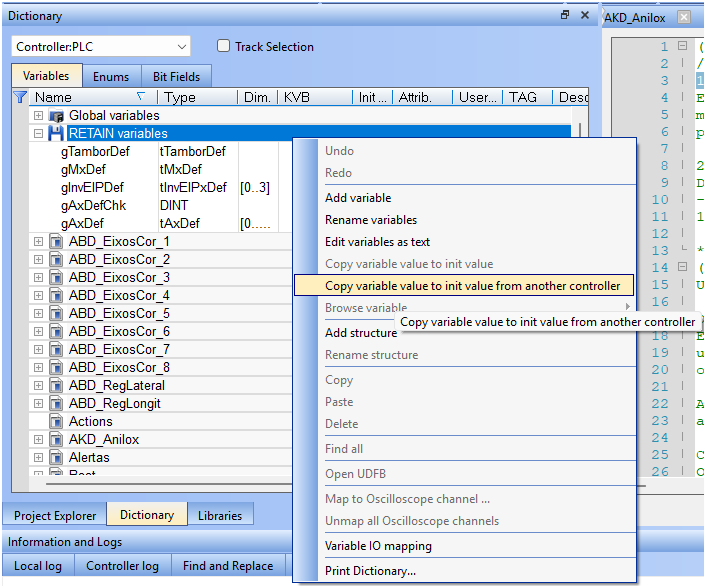
Figure 1: Select Copy variable value to init values from another controller
The Copy Variable Values to Init Valuesdialog box opens. (Figure 2)
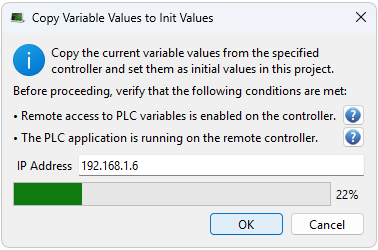
Figure 2: Copy Variable Values to Init Values dialog box
The KAS-IDE retrieves the retained values from the source controllers and stores them as initial values in the current project.
Validation
To ensure data integrity:
- KAS-IDE validates that the retained variable definitions on the source controller match those in the current project, including:
- Array dimensions
- Data type
- Structure definition
- Variable name
- Only variables that pass validation are eligible for transfer.
Transfer Failures
If the KAS-IDE is cannot retrieve all retained variables values, a warning message opens identifying the variables. (Figure 3)
Typical causes of transfer failures include:
- Communication interruptions.
- Missing variables on the source controller.
- Mismatched variable definitions between the source controller and the project.
- Unsupported variable types.
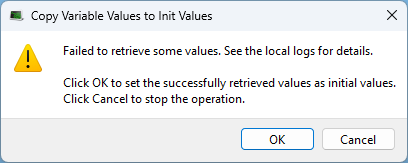
Figure 3: Copy Variable Values to Init Values message
The options are:
- Copy partially retrieved values and continue the operation.
- Cancel the transfer and resolve the reported issues before retrying.
Transfer Retained Variables values to the Target Controller
After the retained variable values have been imported into the KAS project:
- Connect to the target controller.
- Compile and download the updated project.
- Perform a Cold Start of the application:
- Click the Start button drop-down.
- Select Cold Start – Use Initial values for retain variables. (Figure 4)

Figure 4: Cold Start – Use Initial values for retain variables
During the Cold Start, the controller initializes the retained variables using the values stored in the project, restoring the machine configuration on the replacement controller.
-
-
A Cold Start is required to apply the imported initial values to the retained variables on the target controller.


