Configuring the Application
About the Configuration Window
The Kollmorgen Space Configuration window allows you to change some settings of the application editor and the settings of the communication interface necessary for the proper connection to the drive.
It is important to set your communication interface. You can select from the following:
-
Serial Interface (Modbus RTU)
-
The correct Serial Port and check the Service Serial Interface Box
-
The correct Baud Rate, if applicable
-
-
Ethernet Interface (Modbus TCP)
-
CAN Interface (CANopen Over EtherCAT)
Determine the COM Port
To determine the correct COM Port, start a network scan by clicking the Scan  button.
-
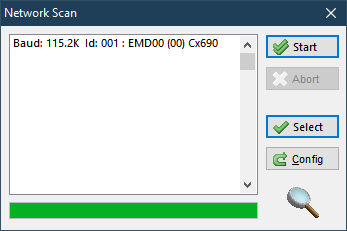
The Network Scan window will appear.
-
Click the Start button to initiate the network scan procedure. Abort the scan any time by clicking the Abort button.
-
Any detected Kollmorgen drives are displayed in the list. To select a device from the list, either double-click the device, or single-click the device then click the Select button.
-
The Network Scan window will close, and the new Baud Rate and Serial Port windows will be set in the Kollmorgen Space Configuration Window.


