Emergency Handling
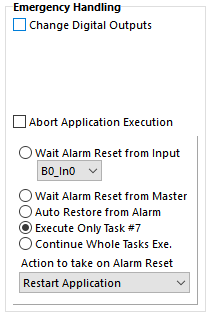
The user can select how to handle emergency situations that could occur during the execution of the Kollmorgen Space application. Set the response in the Emergency Handling window, located in the Kollmorgen Space Global Parameters window > Working Settings.
When an emergency condition is detected by the Kollmorgen Space firmware, application execution is halted, motor movement is aborted, and the actions set in the Emergency Handling window are performed.
It is possible to:
-
Set the Digital Outputs state
-
Abort the application execution
-
Wait for an alarm reset sent from:
-
Digital input
-
Fieldbus (Modbus). See Master_Register object.
-
Drive itself (Auto Restore)
-
-
Execute Only Task #7, typically reserved to program as an Emergency Task.
-
For example, bring the motor to a stop.
-
-
Continue the execution of all tasks
-
Then it is possible to restart the application execution from the beginning (Reset Application Execution) or continue from the instruction where the emergency condition was detected.
The Emergency Handling set by the user is ignored in the following conditions:
-
The drive is in emergency condition since power up.
-
No user program is stored in the NVRAM drive or the program is corrupted.
-
There is an emergency that inhibits the Kollmorgen Space Executor.
If Task #7 is set as Emergency Task, the restore from alarm happens as soon as the task ends.