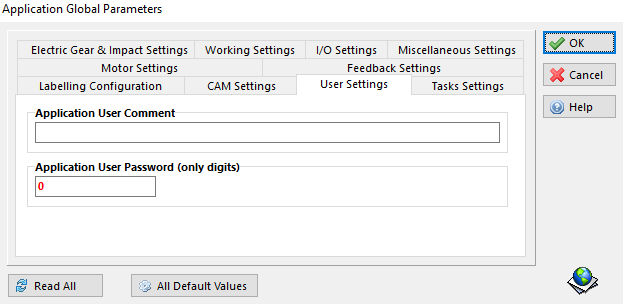
Global Parameters Window – Motor Settings
The Kollmorgen Space Application Global Parameters window is used to set the drive's main parameters.
-
- This is the first task to perform before starting to build the application.
-
You must set the correct parameters according to the paired motor.
-
The parameters are grouped by categories.
-
The explanation about the meanings and range of values of the parameters can be found in the Object Dictionary (see "Kollmorgen Space Object Dictionary").
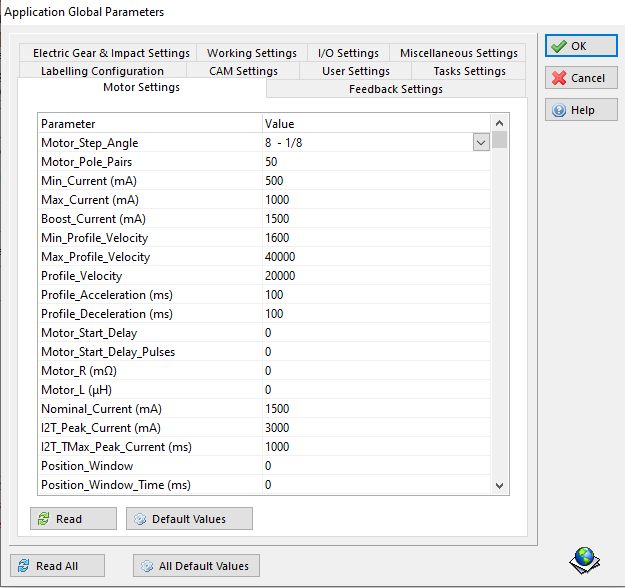
-
- Typical 200 steps/revolution motors will use default Motor_Pole_Pairs = 50. Default Motor_Step_Angle = 8 – 1/8, which is 1/8th microstepping.
-
The parameter values are stored together with the application instruction in the Kollmorgen Space application file (.edspc).
-
To save the parameters, click OK, then click the Save button and create a file name for your application.
-
Click the Read All button to read all the parameters from the drive. Click the Read button to read all the parameters of a single category from the drive.
-
Click the Default Values button to set the default parameter values in the Kollmorgen Space Application Global Parameters window.
-
- Clicking the Default Values button overrides all existing parameter settings.
- To save existing parameter settings, save your application file.
- To download your parameter settings (see " Application Download window").
Under the User Settings tab, you can create:
-
An application comment. This is useful for recognizing the application running in the drive, i.e. name the application in the software.
-
A user password to prevent unauthorized uploading of the application stored on the drive. The default is zero which means there is no password. Minimum digits are one and the max is nine digits. You cannot use zero at the beginning of the password.