Motion Instructions
The motion instructions control motor movement.
MOVE Instruction
The MOVE instruction starts a motor movement. For the explanation of the various movement types refers to Types of Motor Movement.
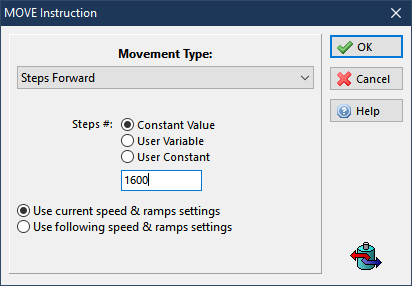
When the Use current speed & ramps settings radio button is checked, the motion profile is given by the current values of the motion parameters. Click the radio button to open the following frame:
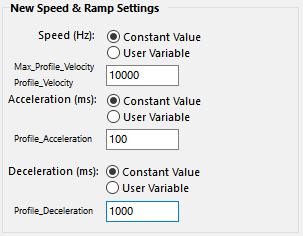
Immediately before the movement is started the following global parameters are changed:
-
The Max_Profile_Velocity and Profile_Velocity objects are set equal to the Speed parameter value. Unit of this variable is Hz.
For example:
-
Motor_Poles = 50 (for industry standard 200 steps/rev or 1.8 deg. Step angle)
-
Parameter is also known as Motor_Pole_Pairs in Global Parameters
-
-
Motor_Step_Angle = 8 (where Full-Step = 1, 1/8th microstep = 8, etc.)
-
Then, Motor_SPR = 50 * 4 * 8 = 1600
To convert from Hz to RPM, use following formula:
-
Profile Velocity in RPM = (Profile Velocity in Hz / Motor_SPR) * 60
where, Motor_SPR = Motor_Poles * 4 * Motor_Step_Angle
-
The Profile_Acceleration object is equal to the Acceleration parameter value. The unit of this variable is ms.
-
The Profile_Deceleration object is equal to the Deceleration parameter value. The unit of this variable is ms.
-
- The MOVE instruction doesn't wait for the end of the movement before passing the execution to the next application instruction. To wait until the motor movement is completed it is necessary to insert a WAIT for motor into the standstill instruction just after the MOVE instruction.
STOP Instruction
The STOP instruction stops the current motor movement. There are three types of motor stop that can be chosen:
-
Stop with deceleration ramp. This is the preferred method to stop a running motor. The motor will stop using the deceleration ramp specified with the Profile_Deceleration object.
-
Stop without deceleration ramp. This method should be used only when the motor is running at very low speed, since it could lose steps due to the load inertia. The motor will stop immediately.
-
Stop with # of steps. The motor will stop within the specified steps number. If the specified steps are fewer than the current deceleration ramp steps, the deceleration ramp will be steeper.
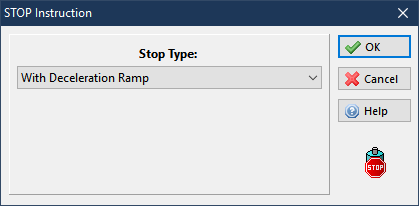
The stop types with Trigger Input or with Sync Object act in the same way as the movement types (see Movements with Trigger and Movements with SYNC). The STOP instruction doesn't wait for the end of the movement before passing the execution to the next application instruction. To wait until the motor movement is completed, it is necessary to insert a WAIT for motor into the standstill instruction just after the MOVE instruction.


