








View NC-Task, Axis, and Drive 1
This section describes options for viewing the NC-task, axis and drive.
The following are options for viewing:
- View NC-Task, Axis and Drive 1 (AKD2GDual Axis SIL2)
- View PDO Objects Mapped for Drive x (AKD2G Dual Axis SIL2)
- View PDO Mapping Mapped by an XML File
View NC-Task, Axis and Drive 1 (AKD2GDual Axis SIL2)
This procedure uses a dual axis model of AKD2G. The drive identified and added to the project tree during the Scan for Boxes set may differ by description and SIL number depending on your hardware model. For single axis models only Axis 1 is applicable.
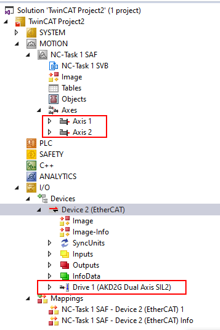
The following shows the tree expanded under NC-Task and Device x (AKD2G Dual Axis SIL2) to demonstrate the primary locations created by importing the device into TwinCAT 3.
View PDO Objects Mapped for Drive x (AKD2G Dual Axis SIL2)
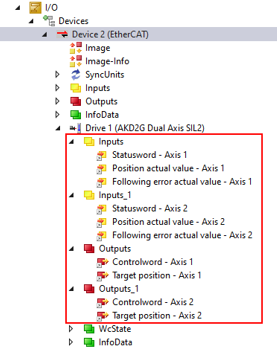
The PDO objects for each axis appear in the tree on the left under the TwinCAT project > I/O > Devices > Device 2 (EtherCAT) > Drive 1 (AKD2G Dual Axis SIL2) as in the example shown below.
Notice the convention of Inputs or Outputs for Axis 1 and Inputs_1 and Outputs_2 for Axis 2.
View PDO Mapping Mapped by an XML File
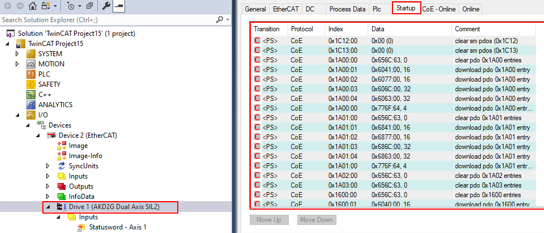
The PDO Mapping is done at startup and the content is set by the XML file. However edits can be made manually in the Startup list or in the PDO mapping under the Process Data tab. For more details on PDO Mapping, see Fixed PDO Mappings and Flexible PDO Mapping.
- In the tree on the left, go to the TwinCAT project > I/O > Devices > Device 2 (EtherCAT).
- Double-click on Drive 1 (AKD2G Dual Axis SIL2)
- Click the Startup tab on the right.
In the Startup tab in TwinCAT, notice the Startup List content that appears are SDOs for mapping the PDOs and the content.
The tables below show PDO objects mapped by XML.
| Objects | Subindex | Description |
|---|---|---|
| 0x6040, 0x6840 | 0 | Controlword |
| 0x607A, 0x687A | 0 | Target Position |
| Objects | Subindex | Description |
|---|---|---|
| 0x6041, 0x6841 | 0 | Statusword |
| 0x6064, 0x6864 | 0 | Position Actual Value |
| 0x60F4, 0x68F4 | 0 | Following Error Actual Value |
The SDOs that initialize the following objects for each axis are indicated in the red box below.
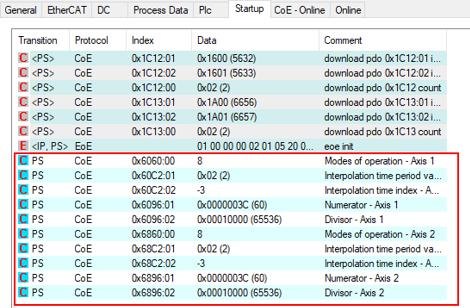
Below are the CoE objects initialized values by Startup that are set by an XML file.
| Objects | Subindex | Description | Value |
|---|---|---|---|
| 0x6060, 0x6860 | 0 | Modes of Operation | 0x08 (Cyclic Synchronous Position) |
| 0x60C2, 0x68C2 | 1 | Interpolation Time Period Value | 0x02 |
| 0x60C2, 0x68C2 | 2 | Interpolation Time Index | -3 |
| 0x6096, 0x6896 | 1 | Velocity Factor-Numerator | 60 |
| 0x6096, 0x6896 | 2 | Velocity Factor-Divisor | 65536 |
Output PDO Mapped Content Axis 1 (Controlword and Target Position)
-
In the tree on the left, go to the TwinCAT project > I/O > Devices > Device 2 (EtherCAT).
- Double-click Drive 1 (AKD2G Dual Axis SIL2).
- Click the Process Data tab.
- Under the Sync Manager, click Outputs.
- Under the PDO Assigment, check the PDO Assignment and PDO Configuration check boxes.
-
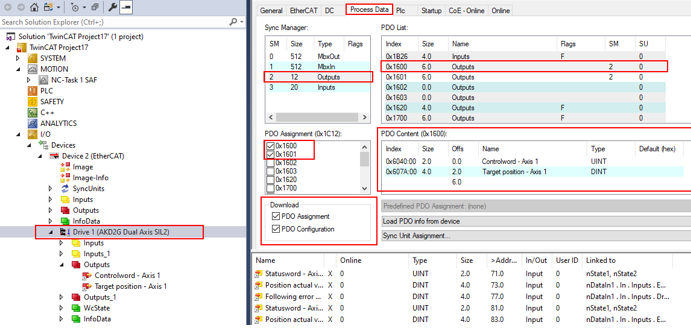
- The default PDO output assignments are 0x1600 and 0x1601 checked below. Click on 0x1600 in the PDO List to display the PDO Content for that PDO. The default mapping is 0x6040 (Controlword Axis 1) and 0x607A (Target Position Axis 1).
Axis 1 PDO Output Mapping
Output PDO Mapped Content Axis 2 (Controlword and Target Position)
Click on 0x1601 in the PDO List to display the PDO content for that PDO. The default mapping is 0x6840 (Controlword Axis 2) and 0x687A (Target Position Axis 2). With a single axis AKD2G the mapping for 1601 is empty with no PDO content.
Input PDO Mapped Content Axis 1 (Statusword, Position Actual Value, Following Error Actual Value)
- In the tree on the left, go to the TwinCAT project > I/O > Devices > Device 2 (EtherCAT).
- Double-click Drive 1 (AKD2G Dual Axis SIL2).
- Click the Process Data tab.
- Under the Sync Manager, click Inputs.
- Under the PDO Assigment, check the PDO Assignment and PDO Configuration check boxes.
-
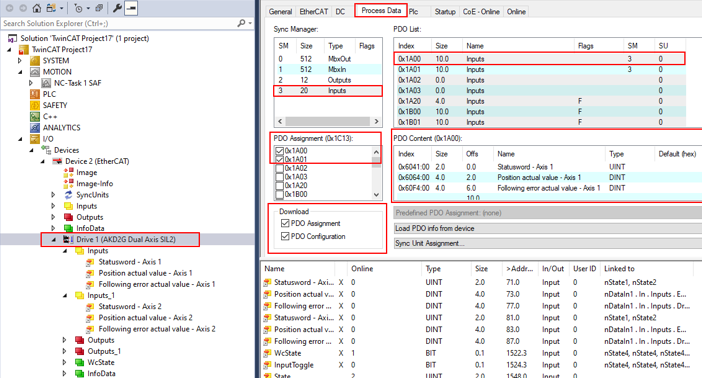
- The default PDO input assignments are 0x1A00 and 0x1A01 checked below. Click on 0x1A00 in the PDO List to display the PDO content for that PDO. The default mapping is 0x6041 (Statusword Axis 1), 0x6064 (Position Actual Value Axis 1) and 0x60F4 (Following Error Actual Value Axis 1).
Axis 1 PDO Input Mapping
Input PDO Mapped Content Axis 2 (Statusword, Position Actual Value, Following Error Actual Value)
Click on 0x1A01 in the PDO List to display the PDO content for that PDO. The default mapping is 0x6841(statusword axis 2), 0x6864 (position actual value axis 2) and 0x68F4 (following error actual value axis 2).
To continue, follow the steps in View PDO Linking.


