








AKD2G EtherNet/IP Touch Probes
Each touch probe can capture two positions, the position on the rising and the position of the falling edge of the trigger input.
On AKD2G, the touch probes are separate from the drive's position capture channels, CAP1 and CAP2. The touch probes use their own dedicated hardware in the drive. The configuration and status of the touch probes will not be available by the CAP#. keywords.
These are the EtherNet/IP touch probe parameters AKD2G supports.
| Touch probe 1 | Touch probe 2 | ||
|---|---|---|---|
| Keyword | Description | Keyword | Description |
|
Touch probe 1 control byte |
Touch probe 2 control byte |
||
|
Touch probe 1 status byte |
Touch probe 2 status byte |
||
|
Touch probe 1 position positive value |
Touch probe 2 position positive value |
||
|
Touch probe 1 position negative value |
Touch probe 2 position negative value |
||
|
Touch probe 1 source |
Touch probe 2 source |
||
|
Touch probe 1 timestamp positive value |
Touch probe 2 timestamp positive value |
||
|
Touch probe 1 negative value |
Touch probe 2 timestamp negative value |
||
|
Touch probe 1 positive edge counter |
Touch probe 2 positive edge counter |
||
|
Touch probe 1 negative edge counter |
Touch probe 2 negative edge counter |
||
The Usage table shows how AKD2G signals are mapped to the touch probe source parameter for EtherNet/IP.
Usage
The values in this table apply to either AXIS#.EIP.TP.SOURCE1 or AXIS#.EIP.TP.SOURCE2.
| Values for AXIS#.EIP.TP.SOURCE# |
Note |
|---|---|
|
-41 to -42 |
Z pulse for Axis 1 to 2 |
|
-31 to -35 |
Z pulse for Feedback 1 to 5:
|
|
-21 to -26 |
DIO1 to DIO6:
|
|
-1 to -12 |
DIN1 to DIN12: When X22 is not fitted options -9 to -12 will not be valid. |
|
0 |
Reserved |
|
1 |
DIN1. Fast Opto |
|
2 |
DIN2. Fast Opto |
|
3-4 |
Reserved |
|
5 |
Valid if AXIS#.PL.FBSOURCE is using a feedback that supports a Z pulse. |
|
6 to 255 |
Reserved |
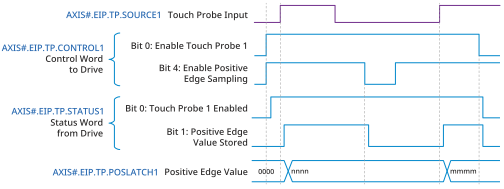
The following diagram shows the sequence for controlling the touch probe feature.
See Also


