
 Function - Creates a new axis object.
Inputs
|
Input |
Data Type |
Range |
Unit |
Default |
Description |
|---|---|---|---|---|---|
|
Name |
STRING |
No range |
N/A |
No default |
Name of the created Axis. |
|
DriverName |
STRING |
No range |
N/A |
No default |
Is the Motion bus driver name or Simulated. |
|
DriveAxisNumber |
UINT |
1 to 256 |
N/A |
No default |
|
|
Address |
DINT |
No range |
N/A |
No default |
Axis motion bus address. |
Outputs
|
Output |
Data Type |
Range |
Unit |
Description |
|---|---|---|---|---|
|
ID |
DINT |
0 to 1024 |
N/A |
Returns the ID of the newly created axis object or 0 if the function failed. |
Remarks
- The ID of the axis object returns 0 (zero) when the number of axes created in the application has reached the maximum permitted for the controller model.
- In this function, the ID is set to 0 (zero) when the number of axes created in the application has already reached the maximum permitted for the controller model.
- When this axis limit is exceeded, the controller generates error E45.
- This error is shown on the 7-segment display and on the Diagnostics tab of the Web server.
- See E45 for an explanation and recommended corrective actions.
- When this axis limit is exceeded, the controller generates error E45.
- The maximum axis count specified for each controller model applies only to physical axes.
- This includes both PLCopen and Pipe Network axes.
- This limit does not apply to virtual axis or digitizing axis.
- In this function, the ID is set to 0 (zero) when the number of axes created in the application has already reached the maximum permitted for the controller model.
-
-
This function should be called after MLMotionInit is called and before MLMotionStart is called.
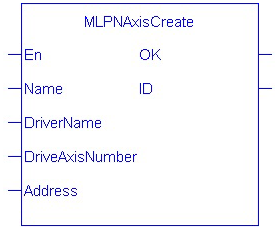
Figure 1: MLPNAxisCreate
FBD Language Example

FFLD Language Example

IL Language Example
Not available.
ST Language Example
PipeNetwork.AXIS1 := MLPNAxisCreate('AXIS1','SercosDriver',0,1001);


