DirectoryOpen

 Function Block - Opens a directory for listing its entries.
- Directories must be closed using DirectoryClose.
- Only 32 open directories are allowed at any given time.
- After a directory is opened, use DirectoryRead to iterate over its entries.
Inputs
|
Input |
Data Type See Data Types. |
Range |
Unit |
Default |
Description |
|---|---|---|---|---|---|
|
Execute |
BOOL |
0 to 1 |
N/A |
No default |
On the rising edge, request to open a directory. |
|
Path |
STRING |
No range |
N/A |
No default |
The path to the directory. |
|
Filter |
STRING |
No range |
N/A |
No default |
|
|
Options |
SINT |
No range |
N/A |
0 (zero) |
|
Outputs
|
Output |
Data Type See Data Types. |
Range |
Unit |
Description |
|---|---|---|---|---|
|
Done |
BOOL |
FALSE, TRUE |
N/A |
If TRUE, the command completed successfully. |
|
Error |
BOOL |
FALSE, TRUE |
N/A |
If TRUE, an error has occurred. |
|
ErrorID |
DINT |
Enumerated |
N/A |
|
|
ID |
UDINT |
No range |
N/A |
|
Options
Options is a bit mask built from these values.
- The type-of-entry bits (DIR_OPTION_FILES, DIR_OPTION_SUBDIRS) are mutually exclusive.
- Only one glob filter option OR one regex option is valid.
- Specifying both a glob and regex results in an error.
- Setting more than one bit within either of these groups produces an error.
|
Constant |
Description |
|---|---|
|
DIR_OPTION_NONE |
|
|
DIR_OPTION_FILES |
Only return regular files. |
|
DIR_OPTION_SUBDIRS |
Only return subdirectories. |
|
DIR_OPTION_ICASE |
|
|
DIR_OPTION_GLOB |
Interpret |
|
DIR_OPTION_ICGLOB |
|
|
DIR_OPTION_REGEX |
Interpret |
|
DIR_OPTION_ICREGEX |
|
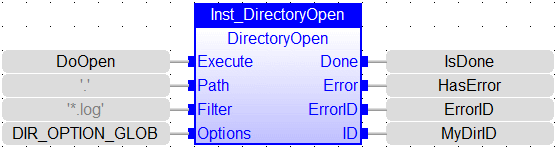
FBD Language Example
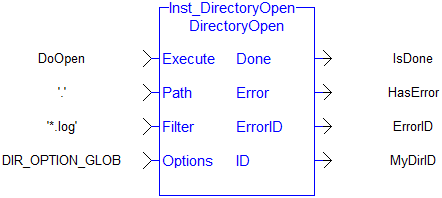
FFLD Language Example
IL Language Example
Not available.
ST Language Example
CASE StepCounter OF
0:
   Inst_DirectoryOpen(TRUE, 'logs', '*.log', DIR_OPTION_FILES + DIR_OPTION_GLOB);
   IF Inst_DirectoryOpen.Done THEN
      MyDirID := Inst_DirectoryOpen.ID;
      Inst_DirectoryOpen(FALSE, '', '', 0);
      StepCounter := StepCounter + 1;
   END_IF;
1:
   Inst_DirectoryRead(TRUE, MyDirID);
   StepCounter := StepCounter + 1;
2:
   Inst_DirectoryRead(TRUE, MyDirID);
   IF Inst_DirectoryRead.Done THEN
      IF Inst_DirectoryRead.ListDone THEN
         // No more entries - move on to next step closing the directory
         Inst_DirectoryRead(FALSE, 0);
         StepCounter := StepCounter + 1;
      ELSE
         EntryName := Inst_DirectoryRead.Entry.Name;
         IsDir     := Inst_DirectoryRead.Entry.IsDirectory;
         // Keep StepCounter unchanged so that return and read the next entry
         Inst_DirectoryRead(FALSE, 0);
      END_IF;
   END_IF;
3:
   Inst_DirectoryClose(TRUE, MyDirID);
   StepCounter := StepCounter + 1;
4:
   Inst_DirectoryClose(TRUE, MyDirID);
   IF Inst_DirectoryClose.Done THEN
      Inst_DirectoryClose(FALSE, 0);
      StepCounter := StepCounter + 1;
   END_IF;
END_CASE;


