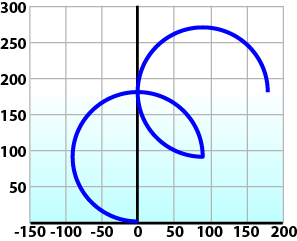
To perform an Absolute Circular Move:
Call MC_MoveCircAbs (Execute, AxesGroup, CircMode, AuxPoint[], EndPoint[], PathChoice, Velocity, Acceleration, Deceleration, JerkIn physics, jerk is the rate of change of acceleration; more precisely, the derivative of acceleration with respect to time, CoordSystem, BufferMode, TransitionMode, TransitionParameter).
In this example, PosCircAuxAbs[0] and PosCircEndAbs[0] represent the x-axis. PosCircAuxAbs[1] and PosCircEndAbs[1] represent the y-axis.
PosCircAuxAbs[0] :=   0;   // A point on the circle that is crossed on the
PosCircAuxAbs[1] := 180;   // path from start to end point.
PosCircEndAbs[0] :=  90;   // Absolute end point.
PosCircEndAbs[1] :=  90;

Inst_MC_MoveCircAbs(TRUE, Group1_ref, MC_CIRC_MODE_BORDER, PosCircAuxAbs, PosCircEndAbs, MC_CIRC_PATHCHOICE_CLOCKWISE, MaxVel, MaxAcc, MaxDec, 0, MC_COORDINATE_SYSTEM_ACS, MC_BUFFER_MODE_BUFFERED, MC_TRANSITION_MODE_NONE, TransParam);
In the example a circular move will be performed on axis group 'Group1_ref'.
- CircMode is defined as MC_CIRC_MODE_BORDER. This mode indicates that the AuxPoint array input will indicate a point on the circle which is crossed on the path from the starting point to the end point. See Circular Moves Diagrams for more information on CircMode movement options.
- The AuxPoint array, 'PosCircAuxAbs', defines an absolute point on the circle which is crossed on the path from the starting point to the end point. The contents of this array are determined by the CircMode variable, MC_CIRC_MODE_BORDER.
- The EndPoint array, 'PosCircEndAbs', contains the absolute end point for each axis in the group. The absolute end point of the axis stored in position 0 (IdentInGroup) of the group will be 90.0. The absolute end point of the axis stored in position 1 of the group will be 90.0.
- PathChoice is only relevant when CircMode is set to MC_CIRC_MODE_CENTER. In this case, this parameter is not used.
- The maximum velocity is specified by variable MaxVel and is specified in 'user units/sec'.
- The maximum acceleration and deceleration are specified by variables MaxAcc and MaxDec and are specified in 'user units/sec2'.
- The maximum jerkIn physics, jerk is the rate of change of acceleration; more precisely, the derivative of acceleration with respect to time is currently not supported and can be set to a value of 0.
- The coordinate system is ACS
- The BufferMode is set to MC_BUFFER_MODE_BUFFERED, indicating the move is buffered. For more information about buffer modes, see the Buffer Modes overview.
- The TransitionMode is set to MC_TRANSITION_MODE_NONE, indicating no transition mode will be used. For more information about transition modes, see the Transition Between Moves section.
- The TransParam array is required. The TransParam array is a 2-element array containing the corner distance and velocity for the transition. Transitions are not used in this example and therefore the contents can be set to 0.
To perform a Relative Circular Move:
Call MC_MoveCircRel (Execute, AxesGroup, CircMode, AuxPoint[], EndPoint[], PathChoice, Velocity, Acceleration, Deceleration, Jerk, CoordSystem, BufferMode, TransitionMode, TransitionParameter).
In this example, PosCircAuxRel[0] and PosCircEndRel[0] represent the x-axis. PosCircAuxRel[1] and PosCircEndRel[1] represent the y-axis.
PosCircAuxRel[0] :=  0;   // Relative center of the circle.
PosCircAuxRel[1] := 90;
PosCircEndRel[0] := 90;   // Relative end point.
PosCircEndRel[1] := 90;   // Start pt 90,90 + rel 90,90 -> 180,180 absolute end pt

Inst_MC_MoveCircRel(TRUE, Group1_ref, MC_CIRC_MODE_CENTER, PosCircAuxRel, PosCircEndRel, MC_CIRC_PATHCHOICE_CLOCKWISE, MaxVel, MaxAcc, MaxDec, 0, MC_COORDINATE_SYSTEM_ACS, MC_BUFFER_MODE_BUFFERED, MC_TRANSITION_MODE_NONE, TransParam);
In the example all the variables have the same meaning as the circular absolute example except:
- CircMode is defined as MC_CIRC_MODE_CENTER. This mode indicates that the AuxPoint array input will indicate the center point of the circle. See Circular Moves Diagrams for more information on CircMode movement options.
- The AuxPoint array, 'PosCircAuxRel', defines the relative center point of the circle. The contents of this array are determined by the CircMode variable, MC_CIRC_MODE_CENTER.
- The EndPoint array, 'PosCircEndRel', contains the relative end point for each axis in the group. The relative end point of the axis stored in position 0 (IdentInGroup) of the group will be 90.0. The relative end point of the axis stored in postiion 1 of the group will be 90.0.
- PathChoice is relevant when CircMode is set to MC_CIRC_MODE_CENTER. In this case, PathChoice is MC_CIRC_PATHCHOICE_CLOCKWISE which specifies the direction of the path.