Compare PLC Programs
-
-
- To compare project files, use the Compare Projects function from the File menu.
- The function for comparing the local project file to that on the controller is accessed from a button on the Status Bar, between the Local and Controller versions. It is active when KAS is connected to a controller.


Once files have been selected to compare, a window opens listing the components of each project and any differences between them.
- How the projects differ is color coded.
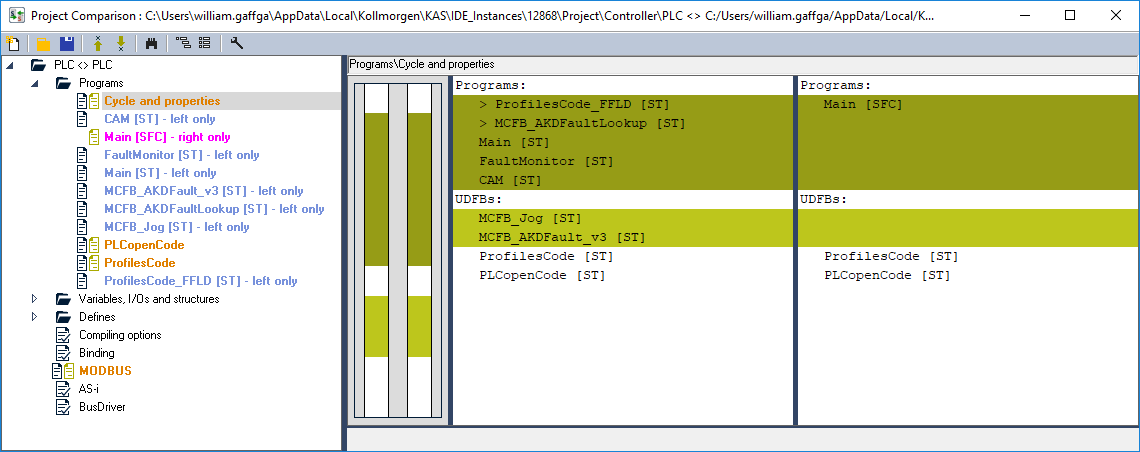
Figure 1: Listing the Differences
This message appears if you click on the compare button but the project is not present on the controller.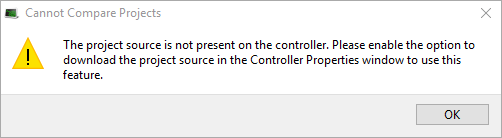
Limitations of FFLD Diagrams
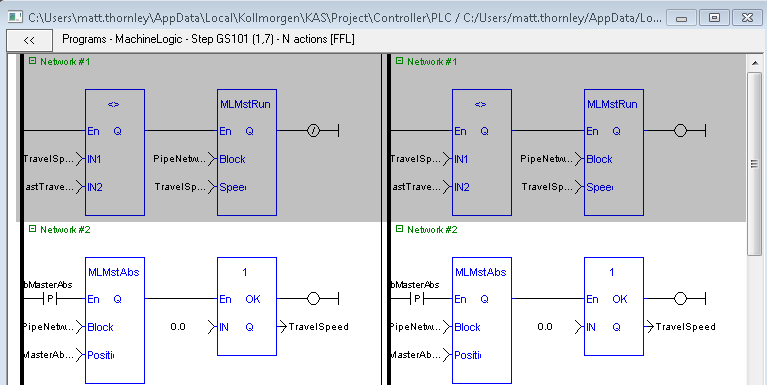
If one or more components within a network differ, then the entire network is displayed in the diff view with a gray background.
Differences between individual components within the network are not specified in any way.
Example: This image has a comparison of two FFLD programs.
- Network #1 differs, but the actual difference is not called out or highlighted.
- The difference is the last element: a coil on the left diagram and an inverted coil on the right diagram.
- Network #2 is the same on the left and right, so it has a white background.