Initialize and Start a Pipe Network
 See Motion State Machine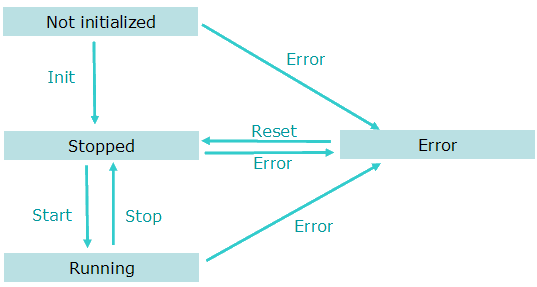
To start a Pipe Network in an IEC 61131-3 application program, these steps must be performed with their respective functions:
|
Step |
ML Function Block |
Description |
|---|---|---|
|
||
|
2. Create Cam Profiles |
Profiles |
Create Cam Profiles from cam files. |
|
3. Create Pipe Network |
Pipe Network |
|
|
||
|
5. Power on all axes |
Pipe Network |
|
|
6. Activate the pipes |
Pipe Network |
|
|
7. Connect the axes to the pipes |
Pipe Network |
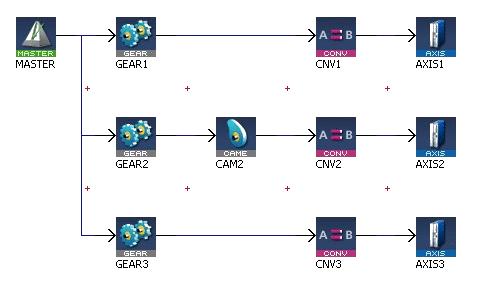
Example: In this Pipe Network, the function connects the Converter blocks (CNV1, CNV2 and CNV3) to the Axis blocks:
|
See click here... about all ML function blocks related to motion


